
Security and privacy overview
Where your data lives, how personal data is protected before a model sees it, and who can see what, summarised for IT and data protection.
These pages are written for IT leads and data protection officers. They describe how Custodos handles your company's data, which settings your admins control, and where the limits are.
The principles
Data is stored in Switzerland
The application and its database run in Switzerland. That is where chats, uploaded files, Company Brain and user accounts are kept. Backups are encrypted before upload and stored in Zurich. More under Where your data lives.
Models work in the region you choose
Admins set the processing region: "Switzerland", "European Union", "EU + Switzerland" (the default) or "Global". Models outside that region are not offered at all, not even as a fallback. Only "Global" admits models without a residency commitment, and your admins make that choice explicitly.
Personal data is pseudonymised before it is sent
New workspaces start with the protection mode "Pseudonymise". Custodos replaces detected names, addresses, IBANs, AHV numbers and other details with placeholders before a message reaches a model provider, and puts the real values back only in the reply. Detection runs in your browser and on the Custodos server, not at a third party. More under How pseudonymisation works.
No training on your input
Custodos does not train AI models on your data. It uses the models in the EU and Switzerland through the business services of AWS, Google Cloud and Microsoft Azure, whose terms rule out using customer input to train models.
A chat belongs to the person who writes it
Admins see usage and costs, never the content of private chats. A share works only for signed-in members of the same workspace, and there are no public links. The Custodos team does not join your workspace. More under Access, retention and deletion.
You decide how long data stays
A retention period set per workspace is enforced every night. Everyone can delete their own chats and close their account.
Which setting controls what
| Topic | Who decides | Where |
|---|---|---|
| Processing region | Admins | Models |
| Protection mode and custom rules | Admins | Settings, section Data protection |
| Security mode | Admins offer it, members switch it on per chat | Settings and in the chat |
| Web search | Admins | Settings, section Web search |
| Retention | Admins | Settings, section Retention |
| Sharing chats | Admins allow it, members share | Settings and in the chat |
| Data protection of a brain | Chosen when the brain is created | In the brain, see Data protection in a brain |
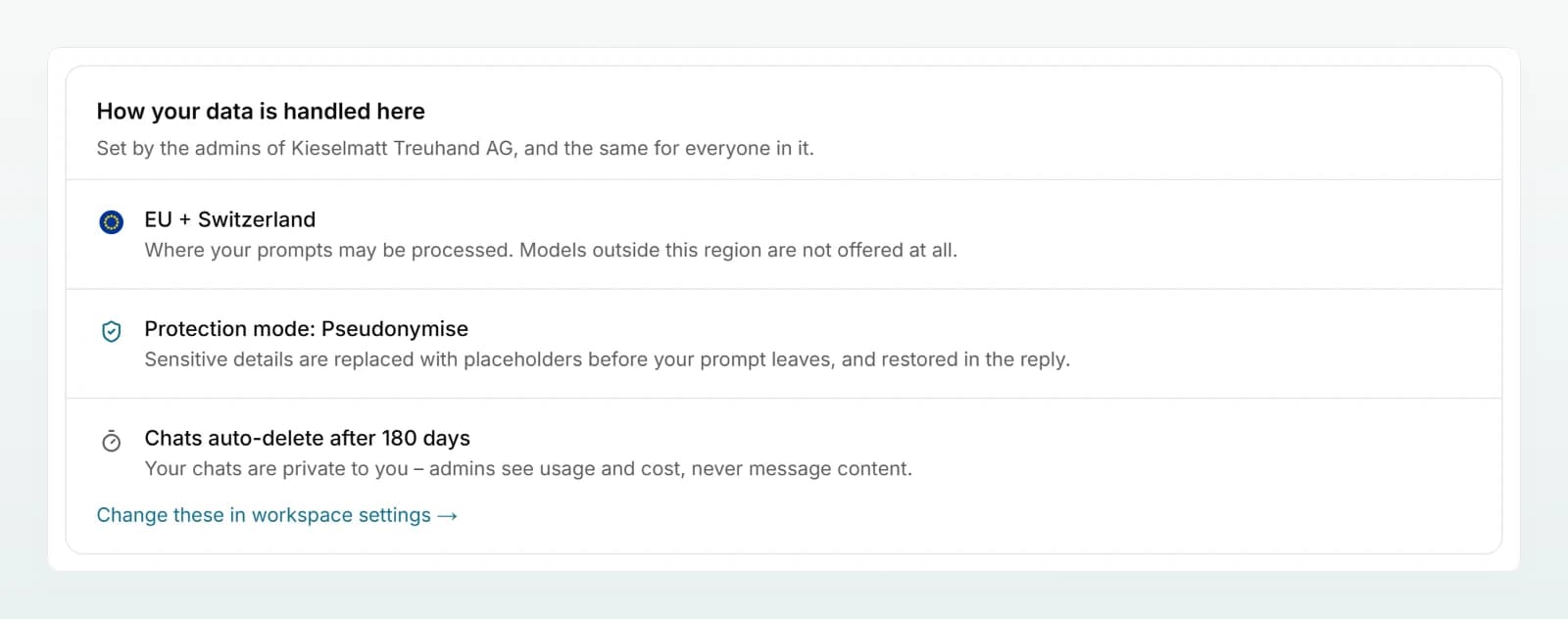
Every member can see the values that apply to them in their account settings, on the How your data is handled here card. Only admins can change them.
Next steps
Storage location, processing region and where a single model runs.
How pseudonymisation worksWhat is detected, what the model sees and where the limits are.
Access, retention and deletionWho can see what, how long chats stay and how to delete data.
Questions from IT and data protectionShort answers on training, subprocessors, evidence and more.