
How pseudonymisation works
Custodos replaces detected personal data with placeholders before a message reaches a model, and puts the real values back only in the reply.
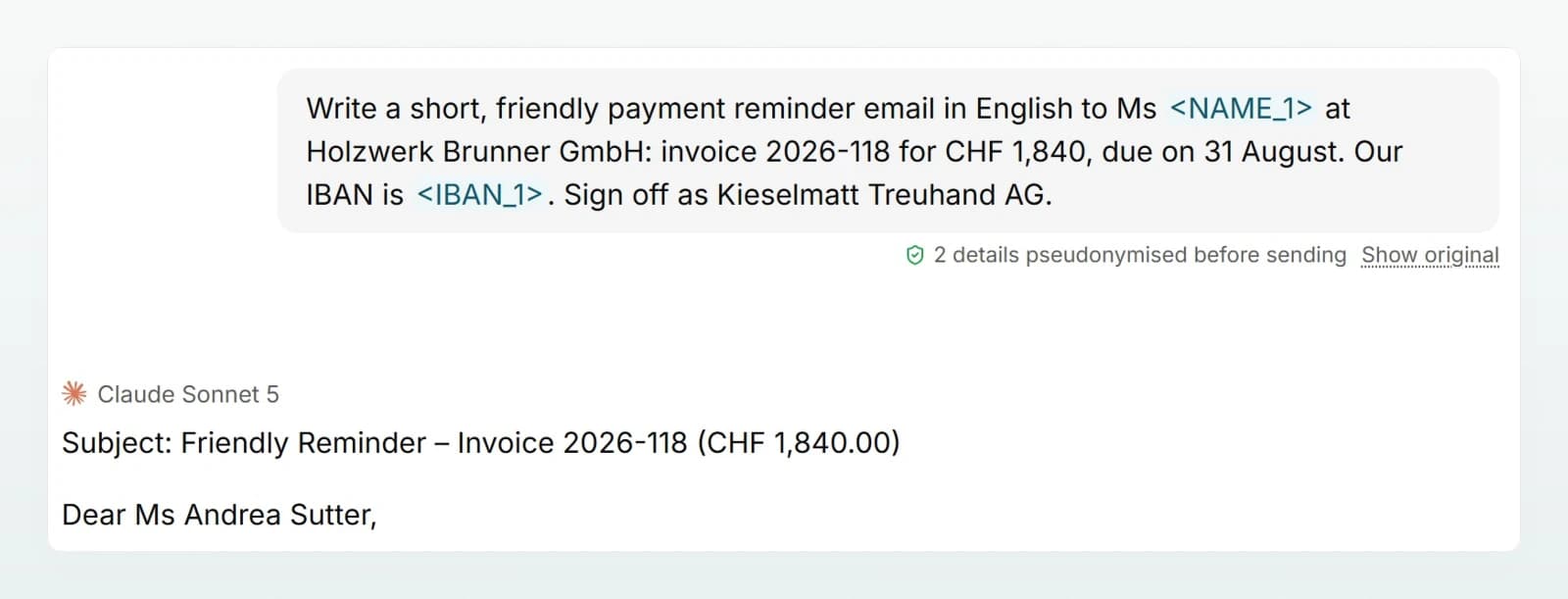
Pseudonymisation means that detected personal data leaves Custodos only as placeholders. The model provider reads, for example, <NAME_1> instead of "Mr Brunner". The link between placeholder and real value stays encrypted at Custodos, so the reply can be restored for you. This is not anonymisation: through that link, the data can still be tied to a person.
How it works
- Detect. As you type, the composer shows which values it has detected. The same detection then runs on the server, so Custodos replaces exactly what the hint announced. No text is sent to a third party for detection.
- Replace. Each detected value gets a placeholder with its category, such as
<NAME_1>or<IBAN_1>. The same value keeps the same placeholder for the whole chat, so the model can follow the references. - Send. The model provider receives the message with the placeholders.
- Restore. Before you see the reply, Custodos puts the real values back in place of the placeholders. A line below the reply says how many values were reinserted.
With Show what the model received you see your message as it was sent. With Show what the model wrote you see the reply before the values were put back.
The link is stored encrypted (AES-256-GCM) per chat, in the database in Switzerland, and never leaves Custodos. When the chat is deleted, by hand or by the retention period, the link goes with it.
What is detected
| Category | Example | How it is detected |
|---|---|---|
| Name | "Mr Brunner", "Anna Weber" | First and last name together, from a list of first names, or a name after a salutation such as Mr, Mrs, Herr, Frau, Madame or Dr. A first name on its own stays. |
| Address | "Bahnhofstrasse 15, 8001 Zürich", "Rue de la Gare 3" | Street with house number, optionally with postcode and town |
| Birth date | "born on 12.03.1985" | Only with a cue in front, such as "born on" or "date of birth" |
| AHV number | 756.1234.5678.97 | By its format, or after "AHV-Nr." even with a typo |
| IBAN | CH93 0076 2011 6238 5295 7 | By its format, lower case too, or after the word IBAN even with a typo |
| Card number | The 16 digits of a credit card | With a valid check digit, or after a word such as "credit card" |
| UID number | CHE-123.456.789 | By its format, or after "UID" or "VAT no." |
| Email address | [email protected] | By its format |
| Phone number | +41 79 123 45 67, 079 123 45 67 | With a country code or a leading zero |
| Reference number | "customer number KD-4711" | Only after a cue such as "customer number", "contract number" or "invoice number" |
Cues are recognised in German, French, Italian and English. Admins can switch individual categories off for the whole workspace, names for example, if company or product names look like first names. With custom rules they add company-specific values such as customer numbers or project names; these appear as <DATA_1>.
Where pseudonymisation applies
Everything that goes from your company to a model is pseudonymised:
- Your message and the earlier history of the chat
- The text and names of attached files
- The instructions of agents and projects
- Text the model reads from connected accounts, such as an Outlook email or a document from Google Drive
- The description an image is generated from
Not pseudonymised:
- Images. Image content cannot be checked. In "Pseudonymise" mode, attached images go unchanged to a model that can read images. In "Block" mode and in security mode, images cannot be attached.
- Brain content. A brain has its own data protection level, independent of the workspace's protection mode. See Data protection in a brain.
- Web search results. They are public text and reach the model unchanged. The search query itself is not pseudonymised, because a placeholder cannot be searched for. If it contains a hard identifier (AHV number, IBAN, card number, UID number), a match for a custom rule or a placeholder, it is not sent.
Pseudonymisation applies to what goes to model providers. Inside Custodos, your messages stay stored as you wrote them, so you, and anyone you share a chat with, can read them.
The three protection modes
| Mode | What happens | Images |
|---|---|---|
| Pseudonymise (recommended) | All active categories and custom rules are replaced with placeholders. Nothing is refused. | Allowed, sent to the model unchanged |
| Block | Messages containing a hard identifier (AHV number, IBAN, card number, UID number) or matching a custom rule are refused. Everything else goes out unchanged, including names, addresses, email addresses and phone numbers. | Not allowed |
| Off | No scanning. Messages go out unchanged. | Allowed |
In security mode everything is always pseudonymised, even if the workspace is set to "Off", and in every category, including the ones switched off.
Sending a value as typed on purpose
Sometimes the model needs a detected value in plain text, or detection got it wrong, for example with a product name that looks like a first name. In the list of detected values beside the chat, untick the value (Send original). The choice applies to the whole chat until you undo it, and every detector then leaves the value alone. You can also add values by hand that should be pseudonymised.
Two things cannot be waived: matches for one of the workspace's custom rules (Fixed by a workspace rule), and any detection in security mode. How this looks in the chat is shown in Protecting personal data in chat.
Limits
Pseudonymisation lowers the risk considerably, but it does not replace your own judgement about what belongs in a chat.
- Names: a surname without a salutation, or a first name that is not on the list, can be missed. Conversely, company and product names that look like a first name are replaced too.
- Patterns, not understanding: detection covers the formats in the table above. Values written in an unusual way can slip through; for formats your company uses again and again, custom rules are the right tool.
- Context stays context: values are replaced, descriptions are not. "Our managing director in Winterthur" can identify a person without a name ever being written.
- Images go to the model unchanged in "Pseudonymise" mode.
- Invented placeholders: if a model writes a placeholder that Custodos never issued, there is no value to put back. It then stays in the reply as a placeholder.
Frequently asked questions
No. The link stays encrypted at Custodos and is never sent along. The provider only receives the placeholders.
No. Because Custodos keeps the link in order to restore replies, the data can still be tied to a person. Pseudonymisation is a protective measure, not anonymisation.
Name detection works from a list of first names and replaces a first name only together with a surname or after a salutation. If a company is named like a person, it is replaced too. In the chat, untick the value; if it affects the whole team, admins can switch the name category off.
Next steps
Where your data lives
Custodos stores your data in Switzerland, and AI models work in the region your admins choose. How storage, region and model fit together.
Access, retention and deletion
Who in your workspace can see what, how long chats stay stored, and how chats, accounts and workspaces are deleted.