
Where your data lives
Custodos stores your data in Switzerland, and AI models work in the region your admins choose. How storage, region and model fit together.
"Where is our data?" covers two different things: where Custodos stores your data, and where an AI model processes a message. The first is fixed. The second is your admins' choice, made with the processing region.
Storage
| What | Where |
|---|---|
| Application and database: chats, uploaded files, Company Brain, agents, user accounts | Switzerland |
| Backups | Zurich, encrypted before upload; the storage provider has no access to the plain text |
| Delivery of sign-in emails | Switzerland |
| Payment processing, only for paid use | EU and USA, billing data only, never chat, file or prompt content |
The companies that provide these services are listed in annex 3 of the DPA (in German) and in the privacy policy.
Processing: the processing region
Admins choose the region under Models, in the section Processing region. It applies to the whole workspace.
| Region | What it means |
|---|---|
| Switzerland | Only models that process in Switzerland. Far fewer models are available, and web search is unavailable because search queries would leave Switzerland. |
| European Union | Only models that process in the EU. |
| EU + Switzerland | Both regions. The default, and recommended. |
| Global | Adds models without a residency commitment, which may process anywhere in the world, for example directly at OpenAI in the USA. This is an explicit decision by your admins. |
The region applies everywhere, not only in the model picker. A model outside the region disappears for every member, including as the fallback when credits run out. The same goes for image generation and for the model that prepares brain documents for search. A member cannot get around the region: Custodos checks it on the server on every request.
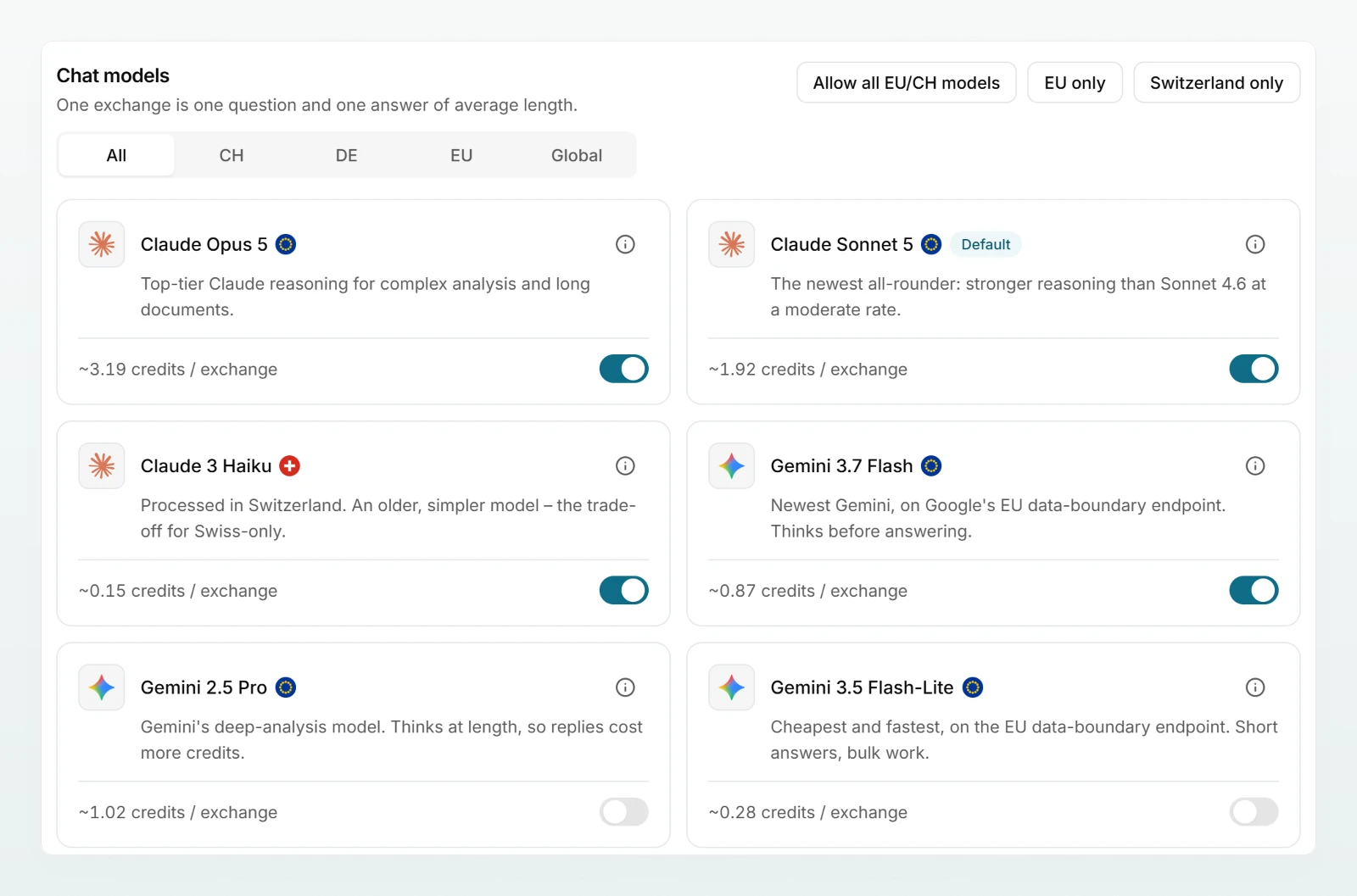
Where a single model runs
In the model picker, every model carries a small mark and a line saying where it runs, for example "Hosted in the EU on Google Cloud". The marks mean:
| Mark | Meaning |
|---|---|
| Swiss cross | Processed in Switzerland. |
| German flag | Single region, processed in Germany. |
| EU stars | Processed inside the EU. The exact country is not fixed: the provider may serve from any of its EU regions. |
| Globe | Processed on the provider's worldwide infrastructure, with no residency commitment. Only available when the region is set to Global. |
Under Models, in a model's Details, admins also see how the location is guaranteed:
| Residency | What stands behind it |
|---|---|
| Enforced | The provider's endpoint serves only the committed region and refuses everything else. The location cannot change unnoticed. |
| Verified | The endpoint is bound to one region, and its addresses can be checked against the published address ranges of that region. |
| Contractual | The region is set on every request and the provider commits to it by contract, but it cannot be measured from outside. |
The list of models changes over time. Your admins can see the current list, with location and residency, under Models at any time.
What else goes to third parties
Web search
When web search is on, only the search query the model writes goes to a European search index based and operated in France. The conversation is never sent. In the "Block" and "Pseudonymise" protection modes, a query containing an AHV number, IBAN, card number or UID number is not sent. Security mode never searches. Admins can switch web search off at any time, see Managing web search.
Context cache
To avoid reprocessing the whole conversation with every message, the model provider may keep a computed intermediate representation of it for a limited time. It stays with the same provider, in the same region, that processes the message anyway; no further recipient is added. Every workspace has its own key that cannot be guessed, so a cache hit across customers is ruled out. If a brain's sharing or the data protection setting changes, the key changes with it. Where the workspace pseudonymises, the cache holds the placeholders, not the real values. Your admins choose the duration, see Retention and context cache.
Connected accounts
Each person connects Google Drive, Microsoft 365 and Outlook with their own account. Custodos reads only what you ask for there, and checks the text against the workspace's data protection settings, like an upload, before it reaches a model. Imported documents are stored as text only; the original file stays with the provider. An image from a connected account is handled like an image you attach directly. Outlook emails are never sent: replies are saved as drafts in your mailbox. Custodos adds a meeting with attendees only once you have confirmed the proposal, and Outlook then sends the invitations. More under Integrations overview.
Frequently asked questions
No. Models outside the region do not appear in the model picker, and the server refuses any request to one. This also applies to chats with agents and to the model that answers when credits run out.
Some providers spread requests across several of their data centres in the EU. What they commit to is then the EU as a whole, not one country. Models with the German flag run in a single region in Germany.
The new region applies from the next message. A chat whose model is now outside the region continues with an allowed model. Stored chats stay where they are, in Switzerland.
Next steps
Security and privacy overview
Where your data lives, how personal data is protected before a model sees it, and who can see what, summarised for IT and data protection.
How pseudonymisation works
Custodos replaces detected personal data with placeholders before a message reaches a model, and puts the real values back only in the reply.