
Security mode
Security mode protects a single chat with a fixed model, pseudonymisation without exceptions and no web search.
Security mode is a switch in the chat for the most sensitive conversations, such as those about client mandates or personnel data. When it is on, a model your admins chose for the purpose does the work, and every detected detail is pseudonymised, with no way to send any of them as typed.
Turning security mode on
Open a new chat
Click New chat in the sidebar. Security mode always applies to a whole chat, so switch it on before the first message.
Click the lock
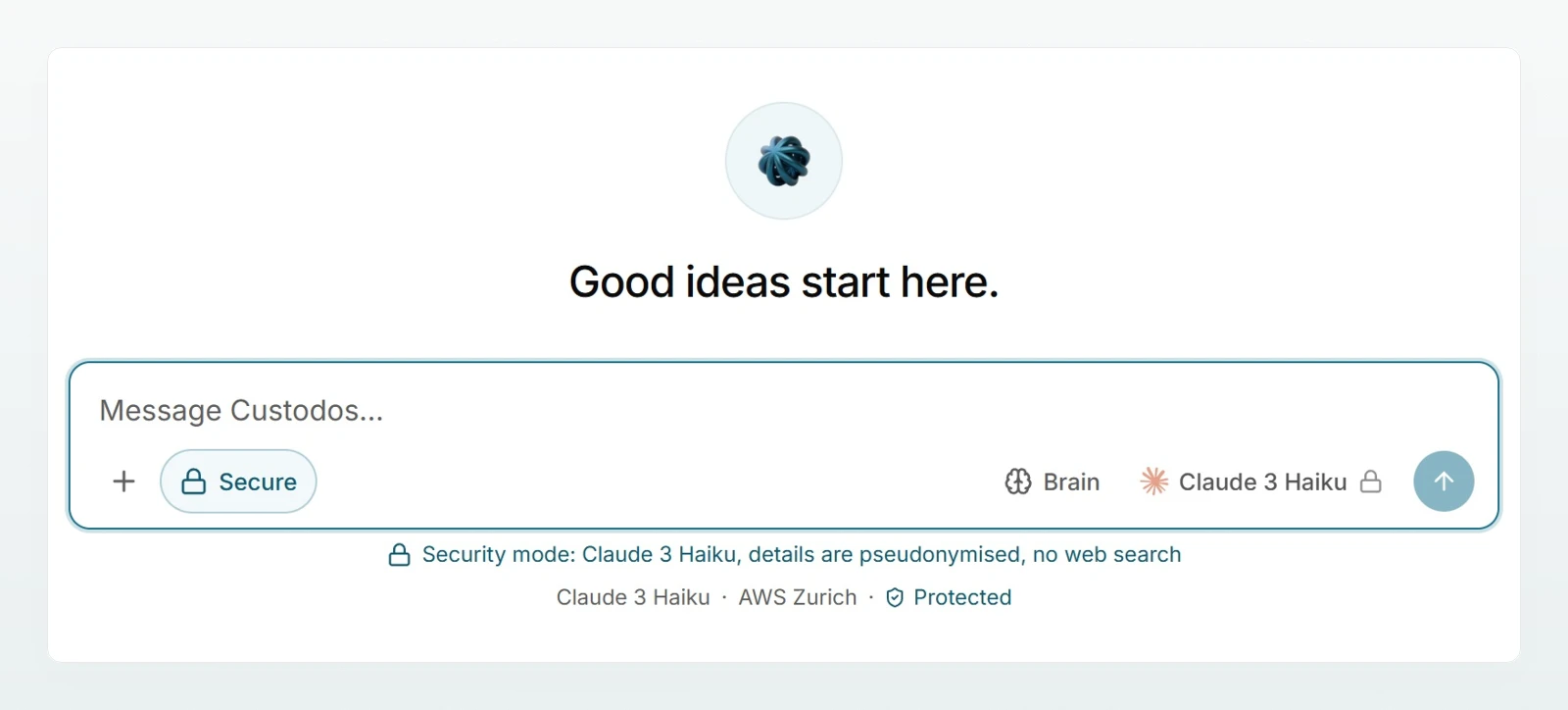
In the input field, click the lock next to + (Turn security mode on). The lock is highlighted and now reads Secure.
Check the settings
Below the input field there is now a line that starts with Security mode:, names the model and continues with "details are pseudonymised, no web search". The model picker is locked and shows Fixed by security mode. Web search is hidden.
Write and send
Work as in any other chat. If your workspace uses the Pseudonymise protection mode, the review panel shows what will be replaced. How that works is described in Protecting personal data in chat.
What security mode guarantees
In the settings, your admins see these commitments under What security mode guarantees:
- Only the chosen model. The picker is locked.
- Pseudonymisation is always on, even if the workspace is otherwise set to Off.
- No web search.
- Send original is disabled. No single detection can be waived.
Compared with an ordinary chat, this means:
| Ordinary chat | Security mode | |
|---|---|---|
| Model | free choice or Auto | fixed |
| Pseudonymisation | depends on the workspace's protection mode | always, with every category |
| Sending individual values unchanged | possible in Pseudonymise mode | not possible |
| Web search | depends on the workspace | off |
| Content from Company Brain | depends on the brain's level | always pseudonymised |
| Outlook, Google Drive, Microsoft 365 used by the model | possible when connected | not available |
| Attaching images | depends on the protection mode | not possible |
| Creating images | depends on the workspace | not available |
You can still attach files such as PDF, Word or Excel. Their content is pseudonymised before it reaches the model.
Turning the mode off again
As long as a chat contains no messages, one click on Secure switches the mode off again. Once the first message has been sent, that is no longer possible. The hint begins with Cannot be switched off in a chat that has started. In that case, start a new chat.
If your admins have set New chats start in security mode, the lock is already active in every new chat. You can still switch it off before the first message.
When security mode is worth it
- Client data: Lea Keller at Kieselmatt Treuhand AG prepares the annual accounts for Holzwerk Brunner GmbH and discusses payroll lists and bank statements.
- Personnel data: references, salary questions, employment contracts, health information.
- Contracts and negotiations where nobody should send a name in plain text by accident.
You do not need it for general questions, web research or images. An ordinary chat is more practical there.
When the credits are used up
If the workspace's credits for this month are used up, the economy model that then applies to everyone also answers in security mode. Pseudonymisation, the region setting and the locked model picker all stay in place. Both notices then appear below the input field. More in Choosing a model.
Frequently asked questions
Your admins do not offer security mode, or no model has been chosen for it. Without a model the switch stays hidden. Ask an admin in your workspace.
The chosen model is currently unavailable, for example because it is no longer enabled. The chat deliberately does not fall back to another model. Ask an admin to set one under Settings.
Image content cannot be pseudonymised. The message reads Images cannot be attached in security mode, because image content cannot be pseudonymised. Use a regular chat for this.
Nothing. Chats already running in security mode keep it, with every guarantee. Only new chats can no longer turn it on.
Yes. Anyone who continues a shared chat in their own copy also works in security mode there. More in Sharing and finding chats.