
Protecting personal data in chat
Custodos replaces or blocks sensitive details before your message reaches a model, and shows you exactly what was sent.
When you type names, IBANs or phone numbers into a message, Custodos checks the text before it leaves the server. Depending on your workspace's setting, detected details are replaced with placeholders or the message is not sent at all.
Which mode applies in your workspace
| Mode | What happens to your message |
|---|---|
| Pseudonymise | Detected details are replaced with placeholders such as <NAME_1> before sending and restored in the reply. Nothing is refused, and images can be attached. |
| Block | A message containing an AHV number, IBAN, card number, UID number or a match for a workspace rule is not sent. Names, addresses, email addresses and phone numbers go out unchanged. Images cannot be attached. |
| Off | No scanning. Messages are sent exactly as you typed them. |
New workspaces start with Pseudonymise, and the settings recommend this mode. You can see which mode applies to you in two places:
- Below the input field, Protected appears with a shield as soon as Pseudonymise or Block is active.
- In your account, the How your data is handled here section names the protection mode.
These categories are detected unless your admin has switched one of them off: names, addresses, birth dates (only after a cue such as "born on"), AHV numbers, IBANs, card numbers, UID numbers, email addresses, phone numbers, reference numbers (for example after "customer number" or "invoice number"), and matches for workspace rules your admins have written.
Sending a pseudonymised message
Write your message
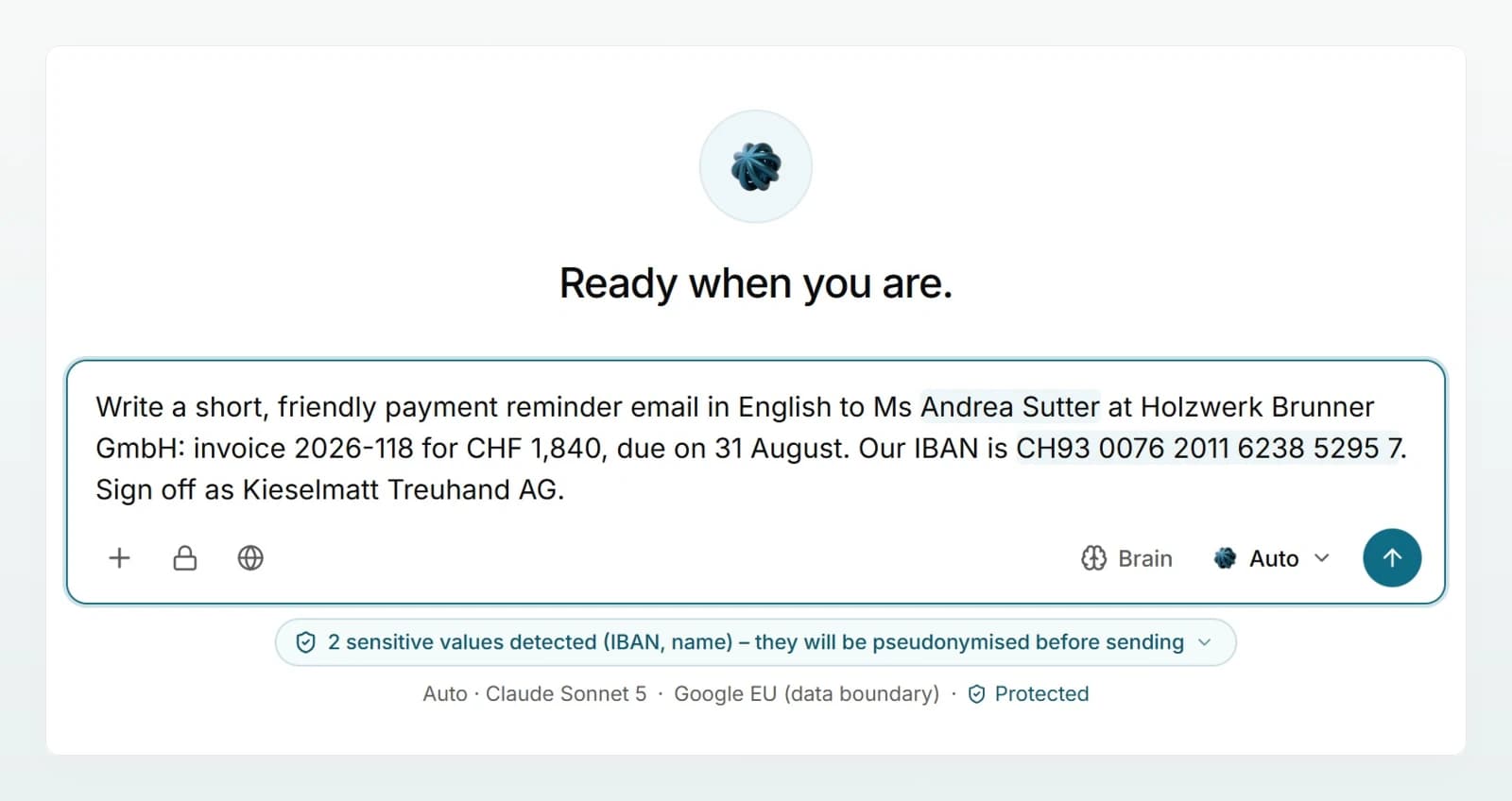
Write as usual, for example: "Draft a friendly payment reminder to Andrea Sutter at Holzwerk Brunner GmbH. Our IBAN is CH93 0076 2011 6238 5295 7." As you type, detected values are highlighted in the input field.
Open the hint
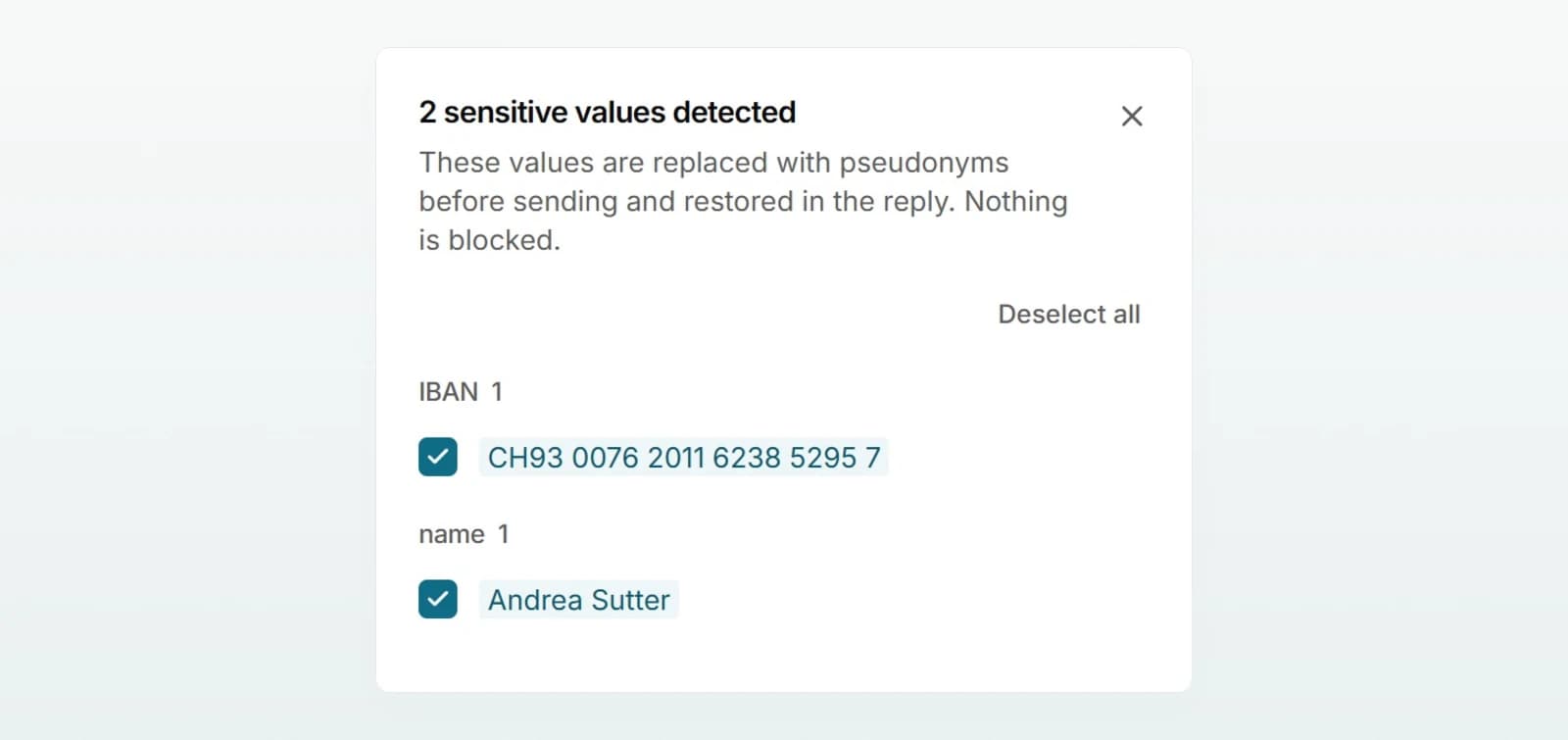
A hint such as 2 sensitive values detected (IBAN, name) appears below the input field. Click it. The review panel opens beside the chat and lists every value by category.
Check and adjust the values
Every value has a tick. Ticked means the value will be pseudonymised. Remove the tick and the value is sent exactly as you typed it.
If a value is missing, select it in your message. While the selection stands, a button Pseudonymise “Mandate 4711” appears in the bar below the text; one click is enough. This works even when Custodos detected nothing else in the message. The review panel offers the same, or you type the value into the Add a value… field.
Send
Send the message. The model receives "…to <NAME_1> at Holzwerk Brunner GmbH. Our IBAN is <IBAN_1>." Below your message you see 2 details pseudonymised before sending. Show what the model received shows the placeholders, and Show original switches back to your text.
Read the reply
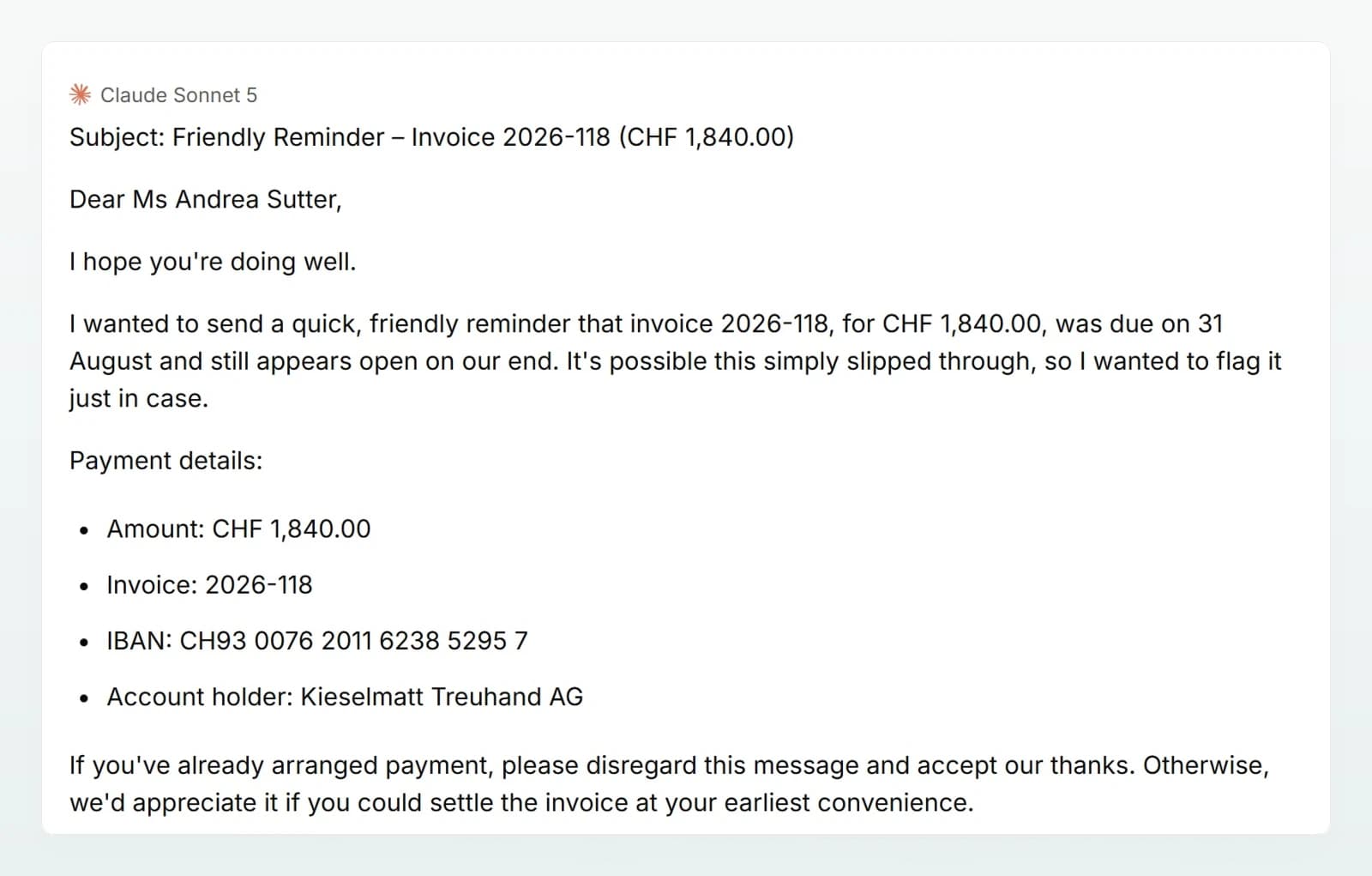
If the model uses placeholders, Custodos puts the original values back into the reply on your screen. Below it you see, for example, 2 values reinserted into the reply. Show what the model wrote shows the reply with placeholders.
The review panel in detail
| Element | Meaning |
|---|---|
| Ticked | The value will be pseudonymised. |
| Unticked, value struck through | The value is sent unchanged (Send original). |
| Lock | Fixed by a workspace rule. This value cannot be deselected. |
| Deselect all / Pseudonymise all | Switch all values at once, except locked ones. |
| In attachments | Values from attached files, grouped by file name. |
| Added manually | Values you added yourself. The cross removes them again. |
Press Esc to close the panel. Your choices apply to the whole chat, even after reloading. A new chat starts afresh with every value detected again. In security mode no value can be deselected.
When your workspace blocks
In Block mode, hard identifiers (AHV number, IBAN, card number, UID number) and workspace rule matches are highlighted in yellow. The hint below the input field starts with Contains protected data (IBAN), and the review panel is titled Protected data detected. Remove takes a value out of your text.
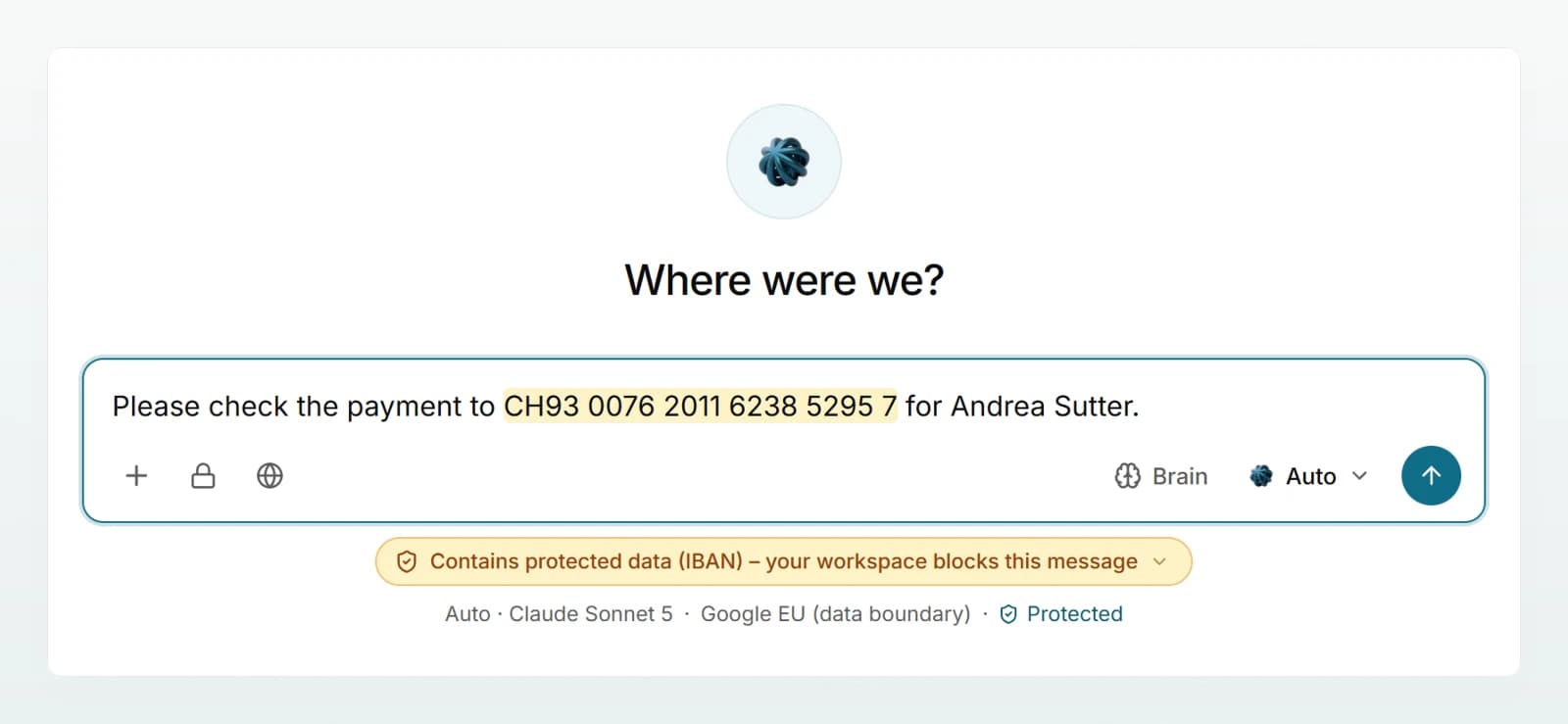
If you send anyway, the message is refused. The notice starts with something like "This message contains IBAN data." and says what you can do. A file containing such details is not imported, and images cannot be attached at all in this mode.
Files, images and integrations
- Files are scanned when you attach them. Detected values are listed in the review panel under In attachments and are pseudonymised every time the file goes out with a message. More in Attaching files and images.
- Images cannot be read by any detection. In Pseudonymise mode an image goes to the model unchanged. In Block mode and in security mode, images are refused.
- Emails and cloud files the model reads through an integration are treated like an attachment: pseudonymised or, in Block mode, withheld.
- Company Brain has its own data protection level per brain. Your choices in the review panel do not apply there. See Data protection in a brain.
Limits of detection
Best practices
- Refer to people with a salutation or their full name ("Ms Keller", "Andrea Sutter"). They are then detected more reliably.
- Untick a company or product name that was replaced by mistake. The choice holds for the rest of the chat.
- Add internal identifiers that have no cue word, such as a mandate number, with Add a value…. If a pattern comes up often, ask your admin for a workspace rule.
- Black out personal data on screenshots before attaching them.
Frequently asked questions
Name detection uses a list of first names and replaces a first name only together with a surname or after a salutation. If a company is named like a person ("Sandra Meier Ltd"), it is treated as a name. Open the review panel and remove the tick. The value then goes out unchanged in this chat, unless the chat runs in security mode.
Custodos can turn back only placeholders that were actually sent for a value in this chat. If the model writes a placeholder that has no original value, it stays visible. Ask the model to phrase that part without placeholders, or fill in the name yourself.
Pseudonymisation could not run, so nothing was sent. Your data did not leave the server. Try again a little later.
No, not the pseudonymised ones. The model receives only placeholders. The originals stay with Custodos and are put into the reply only on your screen. Values you untick, however, reach the model in plain text. You cannot switch the mode itself off for yourself; the admins set it for everyone.
Next steps
For the most sensitive chats: a fixed model and pseudonymisation without exceptions.
How pseudonymisation worksCategories, placeholders and limits in detail.
Attaching files and imagesFormats, limits and what happens to images.
Data protection in daily workWhat belongs in a chat and what does not.