
Testing an agent
The preview in the editor is a real chat with your unsaved draft. You test exactly what your team gets once you save.
On the right of the editor is the Preview. There you chat with the agent as it currently stands in the editor, even before you have saved. This shows whether instructions, knowledge and conversation starters do what they should before a colleague uses the agent.
How the preview works
- A real chat. The preview uses the same models, the same data protection, and the same brains, files and tools as any other chat. That is also why it costs credits like a normal chat.
- Always the current draft. Before every message, the preview picks up the instructions, model and brains as they stand in the editor at that moment. That also applies to Edit and resend and to a regenerated answer. Icon, name, description and conversation starters appear immediately in the empty preview chat.
- Nobody else is affected. Your team's chats keep running with the saved agent until you click Save.
- Not in your history. The preview chat does not appear in the chat list, in search or in any project.
What to keep in mind when testing:
| Part | How it behaves in the preview |
|---|---|
| Brains | Come from Knowledge, not from the input field. Only brains you are allowed to read yourself count. |
| Files | The agent's saved files are attached. If you add or remove one, the preview starts over. |
| Web search | If the switch under Capabilities is off, the preview does not search the web. |
| Model | Follows the Model field. In the preview's input field you can pick another one to compare. |
| Security mode | If your workspace starts new chats in security mode, so does the preview. |
Test and improve
Start with a conversation starter
In the empty preview chat, click one of the conversation starters. That checks what your team sees first: does the starter work without further text, or does the agent ask sensible follow-up questions?
Try real cases
Enter a typical request from your daily work, for example a customer email or notes from a meeting. Then try an incomplete request and a case the agent should refuse or pass on.
Adjust the draft
Change what does not fit, either in the conversation under Create ("The quote should end with a table") or directly in the field under Configure.
Ask the same question again
In the preview, hover over your question and choose Edit and resend, or regenerate the answer. The new answer already uses the changed draft, so you can compare before and after directly.
Save
When you are happy, click Save at the top right (Create for a new agent). Only now does the change reach your team's chats.
Start over
Start over above the preview begins an empty test chat with the same draft. This helps when earlier answers in the conversation influence the result, or when you want to check a conversation starter again.
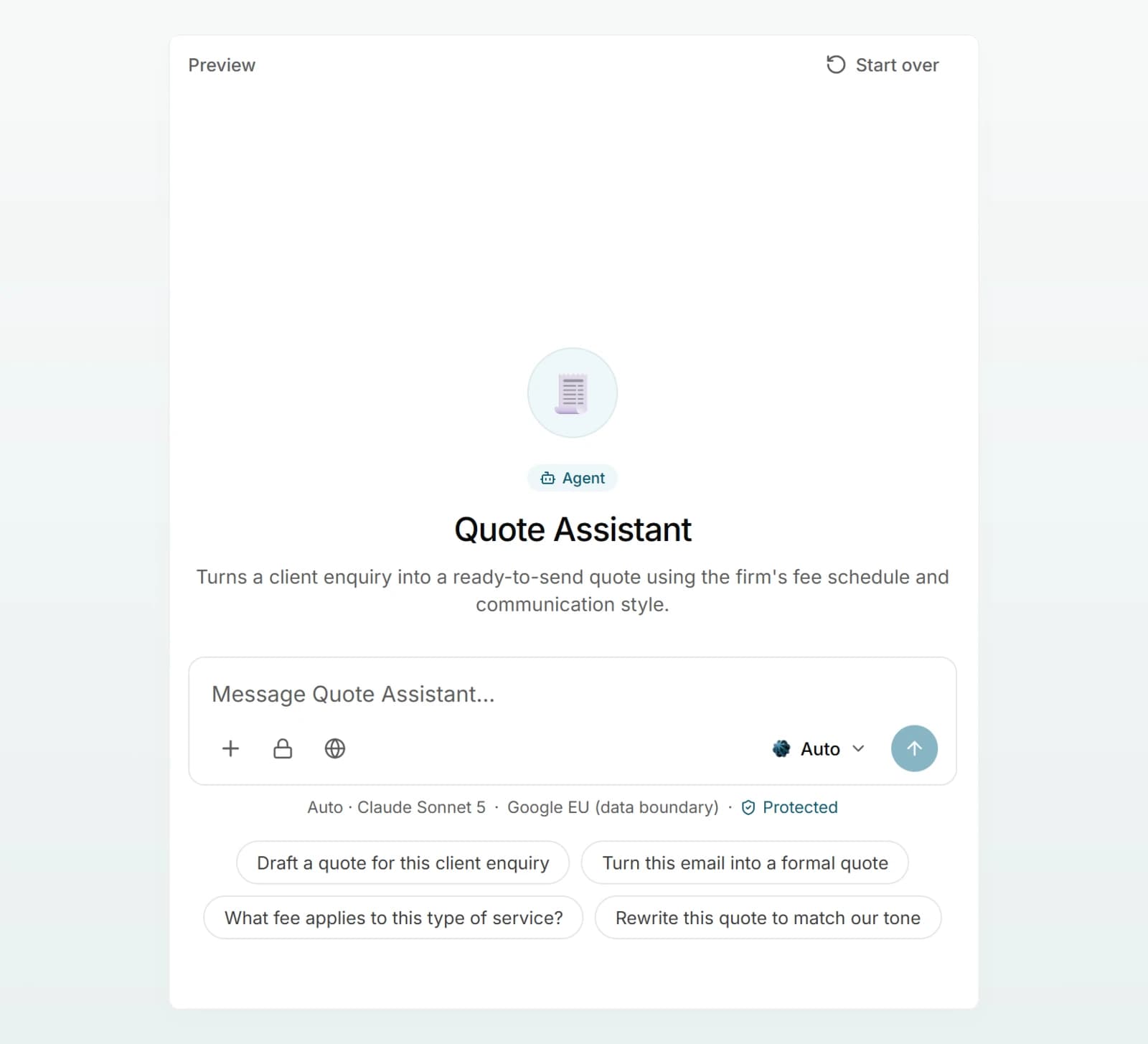
The preview also starts over on its own:
- when you add or remove a file,
- when you open the editor again after more than 30 minutes without activity.
If you reload the page in the middle of testing, the conversation is kept. And when you click Create for a new agent, the test chat carries on with the saved agent.
What to test
| Case | What to look for |
|---|---|
| Typical request | Are the content and the format right? |
| Missing details | Does the agent ask instead of guessing? |
| Edge case | Does it refuse or refer to a person, as the rules require? |
| Sources | Does it name the right documents? Open a citation and check the passage. |
| Tone | Are the form of address, length and style right? |
| Personal data | If the request contains names or account details, the preview shows the same data protection hint as the chat. |
Best practices
- Keep a fixed test set. Keep five to eight real requests in a document and ask them again after every larger change.
- One change at a time. If you change several rules at once, you will not know which one improved the answer.
- Compare in a fresh chat. Use Start over before you run through your test set. Otherwise earlier answers influence the new ones.
- Think of your team's permissions. You test with your own access to brains. Ask someone from the target group to try the saved agent once.
Frequently asked questions
Yes. The preview is a real chat and is charged in credits like any chat message. See Credits and usage.
The preview starts over when you click Start over, add or remove a file, or open the editor again after more than 30 minutes without activity. Test chats are not saved in your history.
Common reasons: you have not saved the change yet. Your colleague is not allowed to read one of the agent's brains. They picked another model in the chat. Or their chat started before a change to the model, brains or files, which apply only to newly started chats.
Check that the brain is added under Knowledge and that its documents have finished processing. See Adding sources and Using a brain in chat.