
Data protection in a brain
Every brain has its own data protection level (Open, Pseudonymise or Strict), independent of the workspace's protection mode.
What a person types in a chat and what a brain stores for the long term are two different things. In a chat, an IBAN is often a mistake. In a brain it can be the answer, for instance to "Which account do we send refunds to?". That is why every brain has its own data protection level, which you choose when creating it.
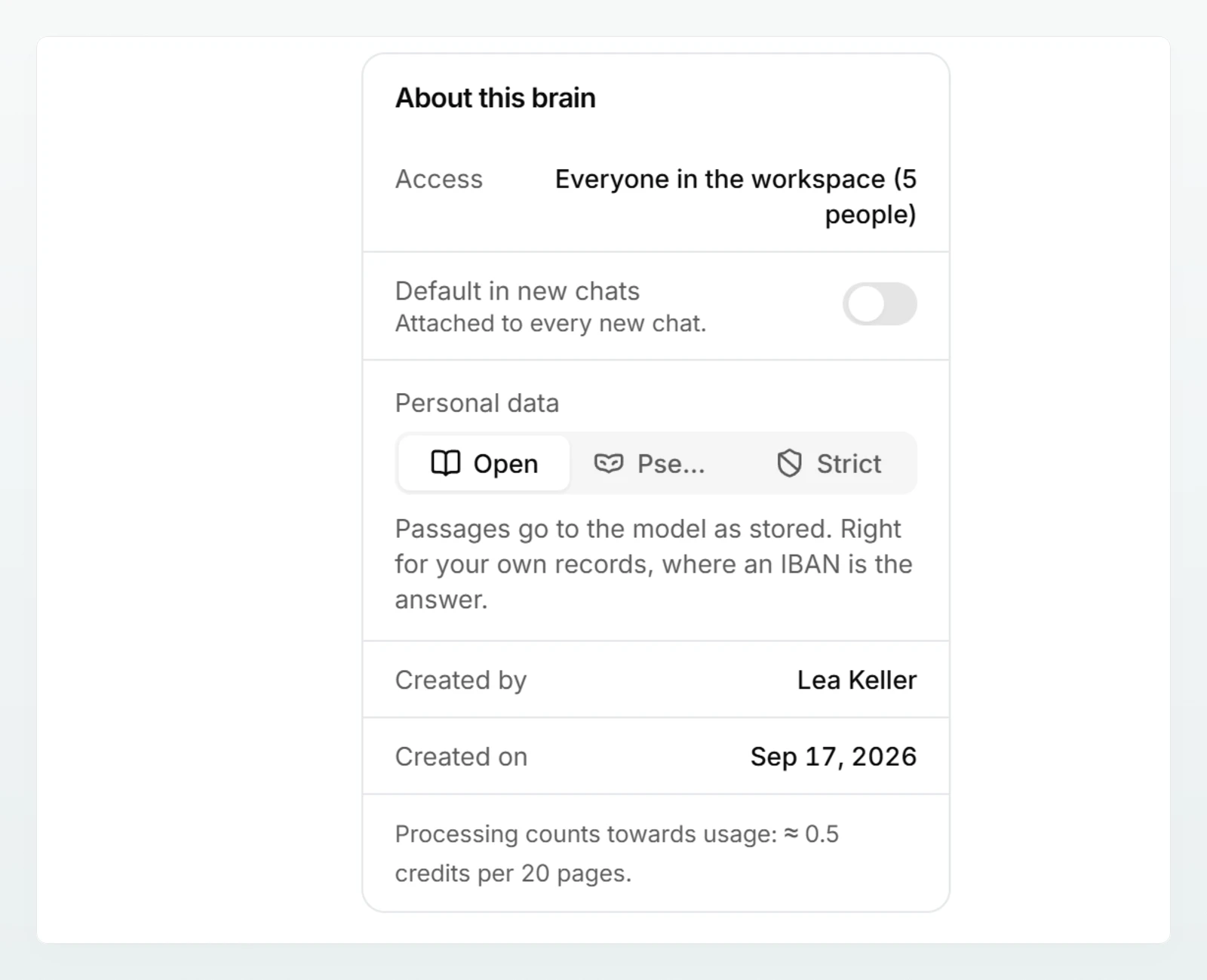
The three levels
Open: "Passages go to the model as stored. Right for your own records, where an IBAN is the answer." Only open brains read images and scanned PDF pages.
Pseudonymise: "Names, IBANs and addresses from this brain become placeholders before the model and are put back in the reply." The model works with placeholders such as <NAME_1>, and you read the answer with the real values.
Strict: Like Pseudonymise. "On top of that, documents carrying an AHV, IBAN, card or UID number are refused at upload." A document that matches one of the workspace's own data protection rules is refused too.
| Open | Pseudonymise | Strict | |
|---|---|---|---|
| Passages in chat | as stored | pseudonymised (condition below) | pseudonymised (condition below) |
| Creating title, summary and overview | as stored | pseudonymised, result stored with the real values | pseudonymised, result stored with the real values |
| When adding documents | everything is accepted | everything is accepted | documents with hard identifiers are refused |
| Images and scanned pages | are read | are not read | are not read |
What applies at every level
- The real text is stored. The level governs what a model gets to see, not what is in the brain. Anyone with access to the brain sees the original values in the preview.
- The search index uses the original values. For the brain to find a question about "Holzwerk Brunner" at all, the text is indexed with the real values. The model used for this step produces no text, only search values.
- The workspace's categories apply here too. If an admin has switched a category off in the data protection settings, it is neither pseudonymised nor checked in the brain.
- No detection is perfect. Names are recognised from first names and typical patterns. How pseudonymisation works explains the method and its limits.
How it interacts with the workspace's protection mode
The workspace's protection mode (Pseudonymise, Block or Off) applies to what people type and attach in chat. The brain's level applies to the brain's content. The two are independent, with four points of contact:
- Preselection. If the workspace is set to Block, Strict is preselected when a brain is created, otherwise Open.
- Pseudonymising in chat. Passages from a brain are only pseudonymised in chat if the workspace is also set to Pseudonymise or the chat runs in security mode. If the workspace is set to Off, the brain page says so: "The workspace pseudonymises nothing (Settings, Data protection), so the retrieval half has no effect. The upload check still applies."
- Security mode. In a chat in security mode, passages from all brains are pseudonymised, open ones included.
- Edit in chat. If you open a document with Edit in chat, it becomes a file in your chat. There the workspace's protection mode applies, not the brain's level.
The workspace settings are described in Configuring data protection.
Changing the level later
- For chats, the new level applies from the next message.
- Strict only checks what is added afterwards: new documents, edited texts and documents refreshed from their source. What is already in the brain is not checked retroactively. To be sure, remove the documents and upload them again.
- Images and scanned pages not yet read are no longer read after a switch away from Open. Content already read stays in the brain as text.
- If a refreshed source in a strict brain contains a hard identifier, the previous version is kept.
Which level fits
| Brain | Recommendation | Why |
|---|---|---|
| "Firm handbook" with fee schedule, expenses policy and checklists | Open | Internal rules with little personal data; scans and images should be readable. |
| "Mandate Holzwerk Brunner GmbH" with correspondence and notes | Pseudonymise | Names and addresses appear in the text; the model does not need them for the answer. |
| Templates for everyone that should never contain account or AHV numbers | Strict | A document uploaded by mistake with an IBAN is refused. |
Frequently asked questions
The model saw placeholders. Custodos puts the real values back into the answer so you can read it. That is exactly how the level is meant to work.
No. Documents with an AHV, IBAN, card or UID number and matches of the workspace's own rules are refused. Names, addresses, email addresses and phone numbers do not lead to a refusal; they are only pseudonymised.
The message starts with "Images only go into brains with". Image content cannot be pseudonymised, so only brains with the Open level accept images. Put the image in an open brain, or add its content as text with Paste text.
No. Whether a document is refused is decided by the brain's level alone. In such a workspace, however, Strict is preselected when creating a brain. If an existing brain should refuse documents with hard identifiers, set it to Strict.