
Web search
Let the model search the web for current information, choose how deeply it searches and check statements against the numbered sources.
A model only knows the world up to its training cut-off. With web search it finds current prices, news, company details or the latest version of a regulation, and names its sources.
How web search works
By default the model decides for itself whether a question needs a search. For "Which flat rates apply to professional expenses in the canton of Zurich in 2026?" it will usually search, for "Make this paragraph friendlier" it will not. While it searches you see Searching the web: followed by the query. The answer contains numbered references such as [1] that link to the source.
Choose the search depth
Open the menu
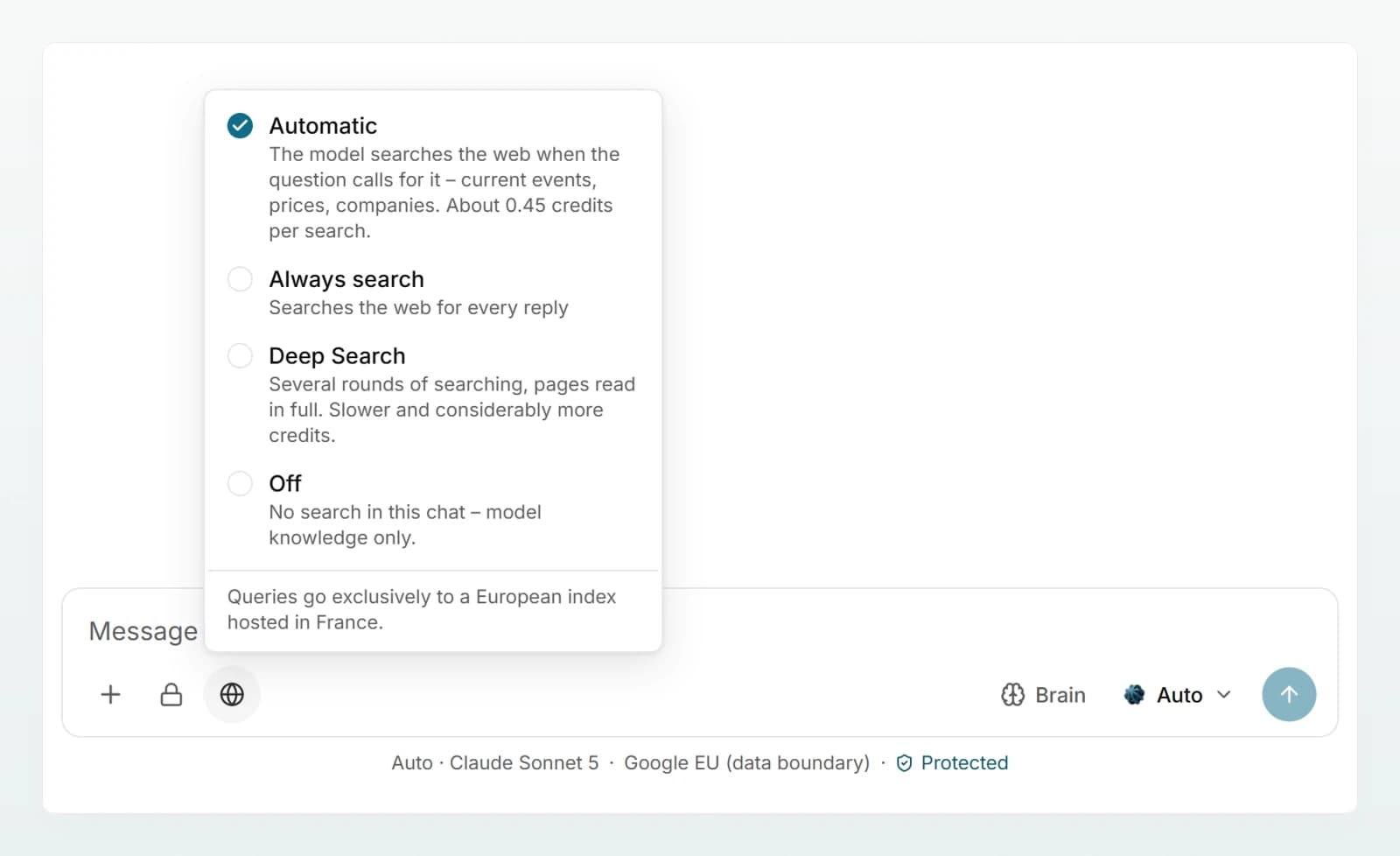
Click the globe Web search in the message box. The menu shows four options and, below them, where the queries go.
Pick an option
Choose Automatic, Always search, Deep Search or Off. Except for Automatic, the globe then shows the option's name.
Send your question
The choice applies to every further message while the chat is open. When you reopen the chat later, search is back on Automatic.
| Option | What happens | When it helps |
|---|---|---|
| Automatic | The model searches when the question calls for it, with up to 3 searches per answer. | For most questions. |
| Always search | At least one search for every answer, up to 3. | When statements should be checked against the current state. |
| Deep Search | Several rounds with up to 8 searches, and up to 5 pages read in full. Slower and considerably more expensive. | Research and comparisons across several sources. |
| Off | No search in this chat, model knowledge only. | Writing or rewriting texts, internal topics. |
You can also turn on Always search with the plus sign Add: the Web search entry then shows a tick. A second click sets it back to Automatic.
Check the sources
Under an answer that used web search you see how many sources were searched. Click it to open the list: the number, title and website of each source, numbered the same way as the references in the text. After a Deep Search the list is already open, shows the number of searches and marks pages read in full with read.
What goes to the search service
- Only the query. The model writes a short query. The conversation and your files are never sent to the search service.
- A European index. The menu says so: "Queries go exclusively to a European index hosted in France."
- No hard identifiers. If your workspace is set to Pseudonymise or Block, a query containing an AHV number, IBAN, card number, UID number or a match for a workspace rule is not sent. The model has to rephrase.
- No pseudonymised values. If the model only saw a name as a placeholder, it cannot search for it. A query containing a placeholder is refused before it costs anything.
The pages found are public and reach the model unchanged. More on where processing takes place in Where your data lives.
What a search costs
Every search costs credits, on top of the credits for the answer. The menu shows the current figure under Automatic, at present about 0.45 credits per search. A Deep Search can run up to 8 searches and reads whole pages, so it uses considerably more. Refused or failed searches cost nothing. More in Credits and usage.
When web search is not available
| Situation | What you see |
|---|---|
| Your admin has switched web search off | No globe in the message box. |
| Your workspace processes in Switzerland only | No globe, because search queries would leave Switzerland. |
| The chat runs in security mode | No globe. Security mode never searches. |
| The chat belongs to an agent without web search | No globe in this chat. |
| The model has no tools | The globe is there, but the model does not search. The model info says "No web or brain search, and it creates no files." |
| The workspace's credits are used up | Search pauses until the credits reset. |
When a chat cannot search, the model is told so, and told today's date. For questions about current matters it should then say that it could not check the information.
Best practices
- Name the place and the time frame: "canton of Zurich, as of 2026" finds better results than a general question.
- If the model answered from memory, switch to Always search and regenerate the answer.
- Use Deep Search for comparisons, such as several payroll software providers, not for simple look-ups.
- Set search to Off when you are only working on your own texts. It saves time and credits.
Frequently asked questions
On Automatic the model decides for itself and does not always get it right. Choose Always search and click the circular arrow under the answer to regenerate it.
No. It only receives the short query the model writes. Queries containing hard identifiers or placeholders are not sent at all.
Web search is off in the workspace, the workspace processes in Switzerland only, the chat runs in security mode, or it belongs to an agent without web search. The table above shows every case.
Yes, as an admin. See Managing web search.
Next steps
Creating and editing documents
Have Word, Excel, PowerPoint and PDF files created, or change your own files in the chat with letterhead, formulas and formatting intact.
Generating images
Have an image created from a description right in the chat, enlarge and download it, and learn where the image model runs.