
Building good agents
A good agent handles exactly one recurring task, has clearly structured instructions and has been tested with real cases.
An agent is only as good as its instructions and its knowledge. This guide shows how to pick the right task, write instructions that work, and test and maintain an agent so that your team trusts it. At the end you will find three complete examples to copy.
Picking the right task
Good candidates for an agent have four traits:
- The task comes up several times a week.
- Several people do it, and today each does it differently.
- The result has a recognisable form: a quote, a reply email, minutes.
- The facts it needs are in documents you can put in a brain.
One agent, one task. A "customer service agent" for everything collects 40 rules over time, and they contradict each other. Two agents with clear names, such as "Email reply agent" and "Complaints", work more reliably and are easier to test.
Instructions that work
The Create chat organises instructions in six sections. Keep that structure when you make your own changes: it helps the model and everyone who maintains the agent later.
| Section | What goes in |
|---|---|
| Role | Who the agent is and whom it works for |
| Task | What it does and with what result |
| Audience | Who reads the result, with what prior knowledge |
| Tone | Form of address, length, style |
| Rules | Sources, prohibitions, when it asks, what it refuses or passes on to a person |
| Output format | The structure of the result, step by step |
Five rules for the text itself:
- Specifics, not adjectives. "Professional" says little. "At most 150 words, no stock phrases, address customers by name" works.
- Say what happens when details are missing. "If details are missing, ask instead of guessing" is often the single most valuable rule.
- Name your sources. "Fees only from the Fee Schedule 2026" instead of "from our documents". The brain also has to be added to the agent under Knowledge.
- Set limits and hand-overs. What does the agent refuse, when does it refer to a person, and how does it say so in the answer?
- Keep it short. The field holds 40,000 characters, but every extra rule competes with the others. The Create chat keeps to about 350 words. Facts belong in a brain, not in the instructions.
Conversation starters that teach
Conversation starters show your team at a glance what the agent is for. One click sends the text straight away. Three rules follow from that:
- Written the way your team writes: a request in the first person, under about 60 characters.
- Every starter works on its own: the agent asks for whatever it is missing. Check this in the preview.
- Show the range: the main task, a variation and a question about rules or sources.
| Weak | Better |
|---|---|
| "Help" | "Draft a quote for a new client" |
| "Question" | "What details do I need for a quote?" |
| "Write email" | "Draft a reply to a complaint" |
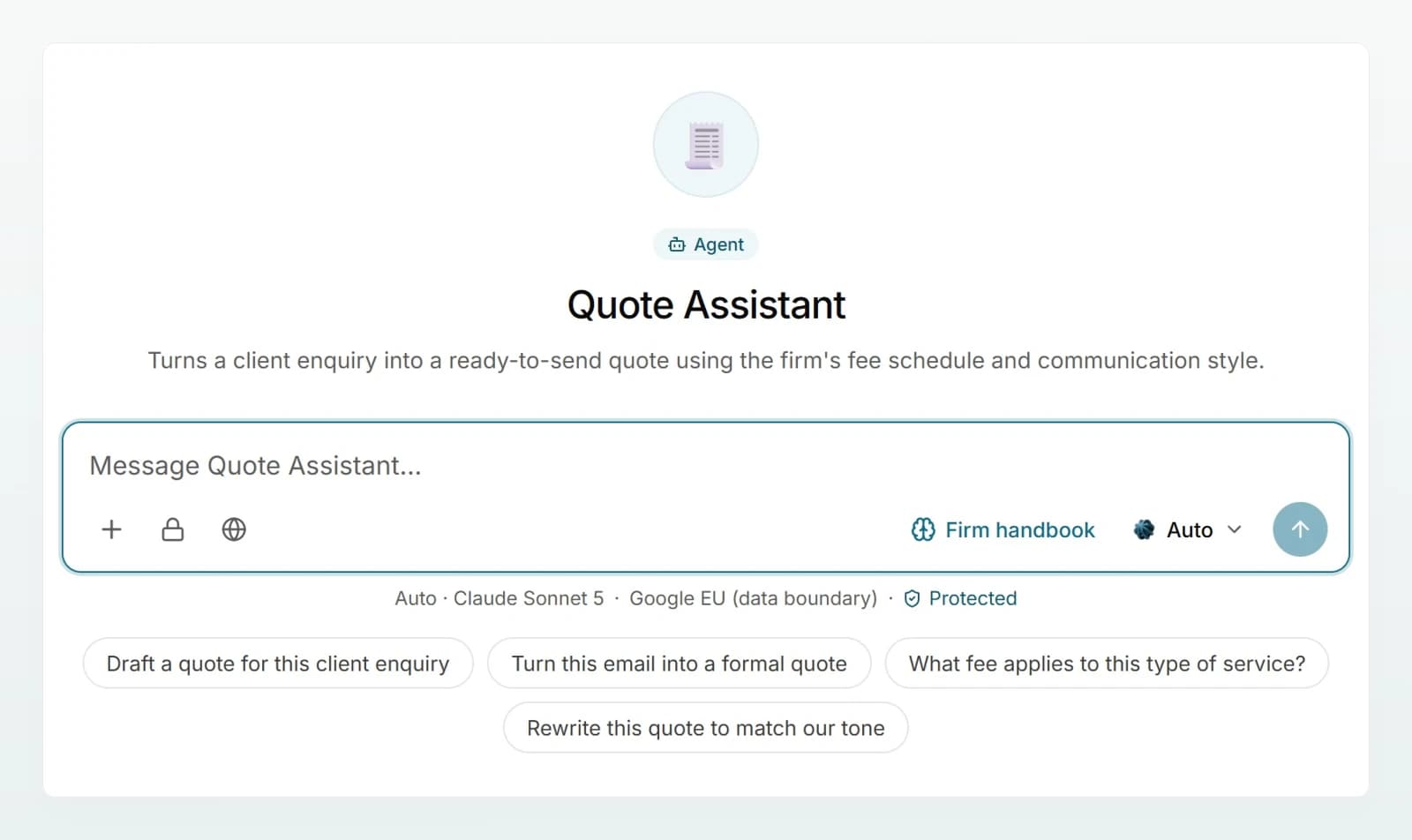
Instructions, brain, file or web search?
| Content | Where | Why |
|---|---|---|
| Way of working, tone, rules, format | Instructions | Applies in every chat, short and stable |
| Price lists, regulations, handbooks | Brain | One place to maintain, citations, access per person |
| A template that gets filled in | File on the agent | Word and Excel are edited directly, the layout is kept |
| Up-to-date public information | Web search | Only switch it on where it is really needed |
Three reasons why facts almost always belong in a brain:
- Less load per message. A brain only supplies the matching passages. A file travels with its whole text on every message.
- One place to update. Replace the fee schedule in the brain, and every agent works with the new version straight away. A price in the instructions goes out of date unnoticed. See Keeping a brain up to date.
- Access per person. Each person only gets answers from brains they may read. A file on the agent is seen by everyone who uses it.
- Many documents? Several brains. An agent can use several brains. Split a large set by topic and every search stays targeted. See Building a good brain.
Testing with real cases
Put together a test set of five to eight real cases and keep it:
- two typical requests,
- one incomplete request,
- one edge case,
- one case the agent should refuse or pass on,
- one request containing personal data.
Run through the set after every change in a fresh preview (Start over). Check the facts against the source, the format, whether the agent asks follow-up questions and whether the tone is right. Then have someone from the target group try the saved agent with their own permissions. Details in Testing an agent.
Naming it for your colleagues
- Name it after the task: "Quote Agent", not "Lea's bot".
- A description that names the result: "Turns a client enquiry into a quote based on the Fee Schedule 2026."
- A fitting icon: 🧾 for quotes, ✉️ for emails. It makes the agent quick to find in the sidebar.
Maintaining it and keeping versions
- One owner per agent. They collect feedback and decide on changes.
- Save versions by hand. Custodos keeps no version history of instructions. Before a bigger change, copy the text with the date into a document so you can go back.
- Test first, then save. Saved instructions apply straight away in every ongoing chat.
- Turn mistakes into test cases. Every request the agent got wrong goes into the test set.
- Review regularly. About once a quarter, and whenever a regulation in the brain changes.
Three example agents
Copy the instructions into the Instructions field, adapt names and documents to your company, and test with your own cases.
For: a fiduciary firm that writes quotes for new clients.
Description: Turns a client enquiry into a quote based on the Fee Schedule 2026.
**Role**
You are the Quote Agent of Kieselmatt Treuhand AG and support the client managers in writing quotes.

**Task**
From an enquiry (a note, an email or meeting notes) you write a quote for bookkeeping, payroll, VAT returns, annual accounts and tax returns.

**Audience**
Owners of small businesses without accounting expertise.

**Tone**
Factual, friendly and clear, following the Client Communication Guide. Always address clients formally and briefly explain technical terms.

**Rules**
- Take fees, hourly rates and flat rates only from the Fee Schedule 2026 and cite the source.
- Check the enquiry against the New Client Checklist. If details that determine the fee are missing, ask first.
- Do not invent prices, discounts or services. Discounts and special terms are approved by the responsible partner: list them as an open point.
- No legal or tax advice in the quote text.

**Output format**
1. A short introduction to the client
2. Table: service, scope, fee in CHF
3. Total excluding VAT and validity as set out in the Fee Schedule 2026
4. Below a line: "Open points" for the client manager
Conversation starters: "Draft a quote for a new client", "Draft a quote from a client enquiry", "What details do I need for a quote?", "Add payroll to an existing quote"
Settings: brain "Firm handbook", web search off, model Automatic, shared with the client managers. The same agent step by step, with a Word template: Writing quotes with an agent.
Next steps
Choosing the right model
Start with Auto, switch to a stronger model for difficult or long tasks and to an economical one for simple bulk work.
Building a good brain
One brain per audience, only current documents, clear instructions, the right access and real test questions, then answers and sources are right.