
A handbook for the whole team
Put policies and processes in a brain, add an agent for the team's questions on top, share both and keep the handbook current with a named owner.
"What is the mileage allowance?", "Who approves holidays?", "What do we need for a new client?" In small companies, questions like these always land with the same two people. A handbook in Custodos answers them around the clock, with a source, and those two people get their time back.
The example: Lea Keller builds the brain "Firm handbook" and an agent "Ask the handbook" for the 18 staff of Kieselmatt Treuhand AG.
Workflow
Collect and tidy up the documents
Collect what the team keeps asking about, for example:
- Fee Schedule 2026 and Expense Policy 2026
- Client Communication Guide
- New Client Checklist
- Holiday rules, working hours, IT and access
Take only the current edition of each document. Documents about individual people, such as payroll lists or appraisals, do not belong in a handbook for everyone. How to choose file names so that new versions replace old ones is explained in Building a good brain.
Create the brain
Open Company Brain and click Create brain.
- Name: Firm handbook
- Description: Fees, expenses, client communication and processes of the firm. Owner: Lea Keller.
- Who can use it? Everyone in the workspace
- Personal data in this brain: Open, because the handbook contains general rules and no client data.
- Instructions under Advanced:
This brain contains the internal policies and processes of Kieselmatt Treuhand AG. Answer questions only with what the documents say and name the document and the section. If something is not in them, say so clearly and refer to Lea Keller. Amounts in CHF. Use British spelling.
Leave Active in new chats by default off. The team reaches the handbook through the agent, and other chats stay lean.
Add sources
In the brain, click Add sources:
- Upload files for PDF, Word, Excel and PowerPoint, up to 20 MB per file and 10 files at a time.
- Paste text for short rules that are not in any document, for example "Holiday rules 2026" or "Who approves what".
- Google Drive or Microsoft 365, if the original is maintained there. Custodos checks such documents for changes regularly.
Processing runs in the background and is finished when every document has the status Ready. It costs about 0.5 credits per 20 pages, once.
Test with real questions
Collect ten questions that were actually asked last month. Enter each one on the brain's page under Test the Brain and check whether the right passage is found. Ask in chat shows you the finished answer with its sources.
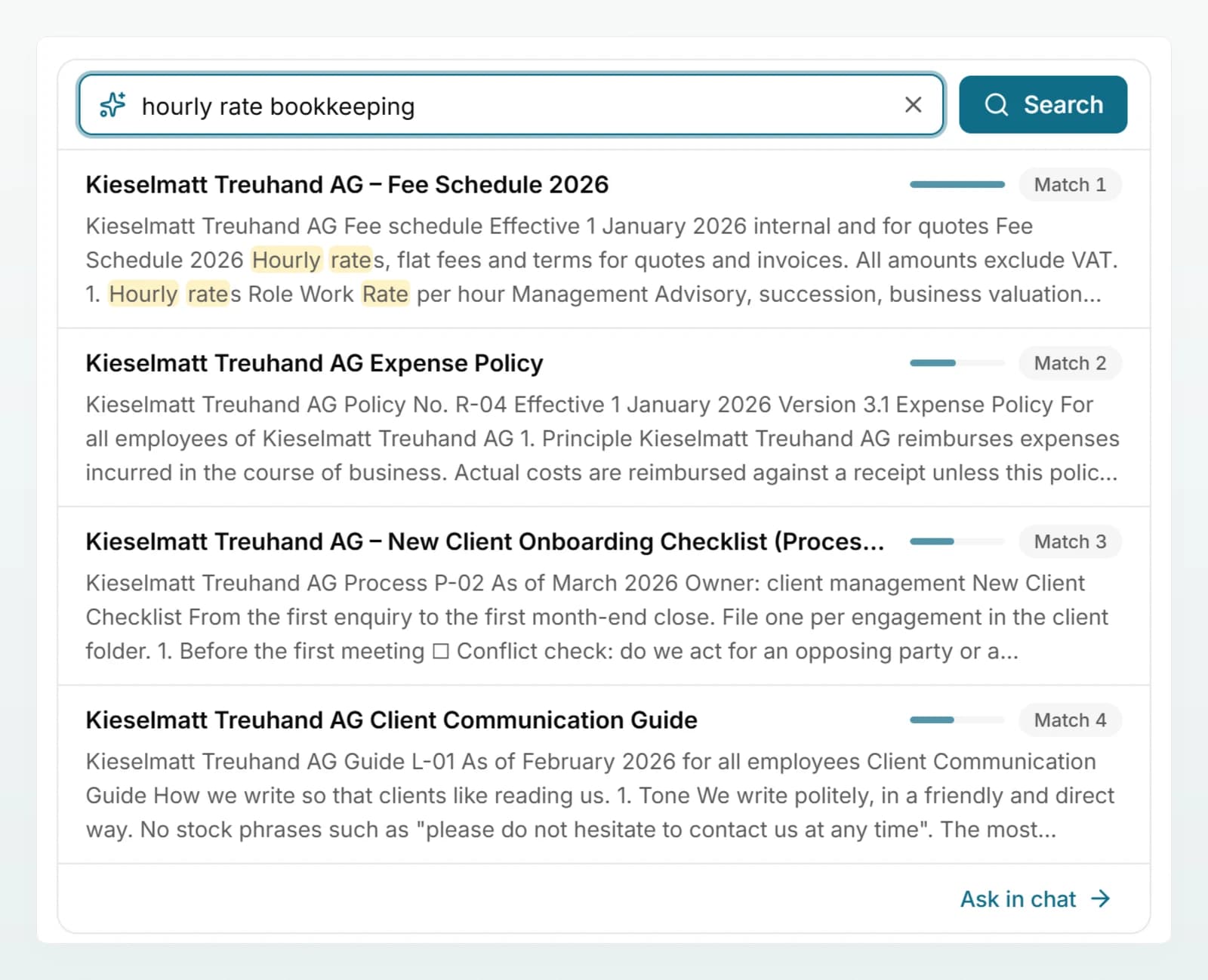
If an answer is not found, add a short note with Paste text, in the words your team uses. Repeat the test until at least nine out of ten questions are right.
Create the agent
Open Agents and click New agent. In the Create tab, describe what it should do:
An agent that answers the team's questions about internal policies, such as expenses, holidays, working hours and the process for new clients. It answers briefly, always names the source and refers to Lea Keller if the handbook does not answer the question. It never invents rules.
Then check in the Configure tab:
- Brains: Firm handbook
- Conversation starters, at most four, for example "How do I claim expenses for a client visit?", "How do I request holidays?", "What goes on the checklist for a new client?"
- Web search off, because answers should only come from the handbook
- under Sharing: Shared with workspace
Test the agent in the Preview with the same ten questions, then click Create. More on writing good instructions in Building good agents.
Introduce it to the team
Send a short message, for example:
New in Custodos: the agent "Ask the handbook" answers questions about expenses, holidays, working hours and new clients, with a source. You will find it under Agents. If an answer is missing or wrong, please tell Lea Keller and we will add it to the handbook.
Who can do what
| Action | Can use | Can edit | Whoever created the brain |
|---|---|---|---|
| Ask in a chat and through the agent | Yes | Yes | Yes |
| Add, replace, delete documents | No | Yes | Yes |
| Change name, description and instructions | No | Yes | Yes |
| Sharing, data protection level, delete the brain | No | No | Yes |
With Everyone in the workspace, every member can use the handbook. Give Can edit only to the one or two people who maintain the content. Whether admins have access automatically depends on a workspace setting; see Sharing and brain access. The agent does not widen access: each person only gets answers from brains they can read themselves.
Keep it current
- One owner, named in the brain's description.
- Upload new editions under the same file name. The old version is then replaced automatically. Under a different name, mark the old one with Mark as replaced.
- Fifteen minutes a month: process documents marked Error again, ask two test questions, add reported gaps as notes.
- Check the overview: after larger changes, Custodos rebuilds the Overview once everything has been processed.
- Refine the agent: saved changes to its instructions apply immediately, including in ongoing chats with the agent.
Measuring whether it helps
On the Usage page, Custodos shows admins credits per member and per model, but not how often a particular brain or agent was asked. So measure by simple means:
| What | How | Goal |
|---|---|---|
| Quality | Ask the ten test questions once a month | At least nine correct answers with a source |
| Gaps | Count reported questions without an answer | Falls from month to month |
| Relief | The two people usually asked estimate their questions per week, before and after | Clearly fewer questions |
| Satisfaction | One question in the team survey: "Do you find answers about internal rules faster than before?" | A majority says yes |
How to run such a survey is explained in Rolling out AI in your team.
Frequently asked questions
Two editions of the document are probably in the brain under different file names. Mark the old edition in the document list with Mark as replaced. It stays readable but is no longer used for answers.
The brain alone is enough if members select it themselves under Brain in the message box. The agent makes getting started easier: it is visible in the list of agents, comes with conversation starters and has fixed instructions, for example to refer people to the person responsible.
Yes. With access set to Everyone in the workspace, anyone who joins the workspace can use the brain and the shared agent immediately.
A handbook usually only says who is responsible for what. Documents about individual staff, such as payroll lists or appraisals, belong in a separate brain with restricted access or not in Custodos at all. See Data protection in daily work.