
Rolling out AI in your team
A plan for teams of 5 to 50 people, with a named owner, five tasks as a starting point, 30 days week by week, a kickoff, ready-made messages and measuring success.
Switching on an AI tool takes five minutes. Getting a team to still use it every day a month later takes a plan. This guide is written for small companies: one person leads, two tasks come first, and after 30 days you decide with figures how to continue. The example is the fictional Kieselmatt Treuhand AG, a Swiss fiduciary firm with 18 staff.
A named owner
Name one person to lead the rollout. In small companies this is rarely IT. It is someone who knows the processes and whom the team listens to. At Kieselmatt it is Lea Keller, head of accounting. She needs the admin role in Custodos and about two hours a week in the first month.
Her tasks:
- set up the workspace and define the ground rules,
- choose and prepare the first use cases,
- answer questions or pass them on to the champions,
- evaluate and decide after 30 days.
From about ten people onwards, champions help: one person per eight to ten staff who tries Custodos early, answers questions in the team and collects good examples.
Finding the first use cases
Do not start with "everything AI can do". Start with tasks that cost time today:
- Ask the team or the champions for five tasks that recur every week and consist mainly of reading, writing or summarising.
- Estimate how much time each one takes per month.
- Rate the benefit (1 to 3) and the effort until the first good result (1 to 3). Effort goes up when documents have to be collected first or the data is sensitive.
- Start with high benefit and low effort. Take at most two tasks into the first month.
This is what the list looked like at Kieselmatt:
| Task | Time per month | Benefit | Effort | Decision |
|---|---|---|---|---|
| Emails to clients about missing documents | 6 hours | 3 | 1 | Week 1 |
| Answering internal questions about expenses and holidays | 4 hours | 2 | 2 | Week 2, with a brain |
| Quotes for new clients based on the Fee Schedule 2026 | 8 hours | 3 | 2 | Month 2, with an agent |
| Updating client contracts to new fees | 5 hours | 3 | 2 | Month 2, in security mode |
| Analysing timesheets per client | 3 hours | 2 | 2 | Later |
You will find matching guides among the use cases, for example Writing quotes with an agent and A handbook for the whole team.
The 30-day plan
Week 0: Prepare
- Set up the workspace: protection mode, processing region, models, web search and, if you work with client or personnel data, security mode. The checklist is in Set up your workspace.
- Write the ground rules on one page: what belongs in Custodos, what does not, when security mode applies, and that results are checked before they go out. Template: Data protection in daily work.
- Invite the champions and try the first two tasks with them. Write down three good prompts for task 1.
Week 1: Kickoff and first task
- Kickoff with everyone (agenda below), then invite everyone under Members. Invitations are valid for 7 days.
- Everyone uses Custodos for task 1, at least once a day.
- One channel for questions and examples, in Teams, Slack or by email. Champions answer within a day.
Week 2: Knowledge and second task
- Create a brain for task 2 and test it with ten real questions. See Building a good brain.
- Fifteen minutes of exchange in the team: what worked, what did not?
- Share the best chat of the week as an example for everyone.
Week 3: Broaden
- Every person names one task of their own that they have done with Custodos.
- Turn a prompt that several people use into an agent. See Building good agents.
- On the Usage page, check who has not started yet and approach those people personally.
Week 4: Evaluate and decide
- Look at the figures on the Usage page and evaluate the short survey (message below).
- A 30-minute review with the champions: which tasks stay, which come in the second month, and are monthly budgets or different seats needed?
- Share the outcome and next steps with the team.
A 45-minute kickoff
| Time | Content | Who |
|---|---|---|
| 5 min | Why we are doing this and what we want to achieve in 30 days | Owner |
| 5 min | Ground rules: what may go in, pseudonymisation, security mode, checking results | Owner |
| 15 min | Live demo: task 1 from the message to the finished text, once with a weak and once with a good prompt | Champion |
| 10 min | Everyone tries it with a task of their own and a prepared prompt | Everyone |
| 7 min | Questions and first impressions | Everyone |
| 3 min | What happens next: channel for questions, champions, meeting in week 2 | Owner |
Show a real task from your daily work in the kickoff, not a gimmick. And say explicitly that admins see no chat content, only usage and cost. That removes a lot of hesitation.
Messages to copy
Adapt names, dates and tasks and send the messages via Teams, Slack or email.
Announcement, one week before the kickoff
Dear team
From next week we will be working with Custodos, an AI workspace for texts, documents and questions. We are starting with a task that costs all of us time: emails to clients about missing documents.
On Tuesday, 6 October, at 9:00 we will show you how it works in 45 minutes. Please bring your laptop and an email you need to write this week.
Your data stays protected: names and account numbers are replaced with placeholders before processing, and nobody in the company can read your chats.
Questions in advance to Lea Keller.
Invitation and ground rules, straight after the kickoff
Your invitation to Custodos is in your inbox. It is valid for 7 days, please accept it today.
Our ground rules:
- Custodos is for drafts, summaries and research. Anything that goes out, you check yourself.
- Client and personnel files are only worked on in security mode (the lock in the message box).
- Passwords and credentials never go into a chat.
- Black out names or account numbers in screenshots beforehand.
Please post questions and good examples in the AI questions channel. Your contacts are Lea Keller and Tobias Frei.
Tip of the week, in week 2
Tip of the week: attach documents as a file instead of pasting text. The file stays available for the whole chat, and you can keep asking about it.
New: the brain "Firm handbook" holds our fee schedule, expense policy and processes. In the message box, select the Firm handbook under "Brain" and ask, for example, "What is the mileage allowance?". The answer names its source.
Survey, in week 4
After four weeks of Custodos we would like to know how it is going. Please answer three questions by Friday, it takes two minutes:
- How much time did Custodos save you in a typical week: none, under 30 minutes, 30 to 60 minutes, more than an hour?
- Which task does it help you with most?
- What is missing or getting in the way?
Measuring success
The Usage page is only visible to admins and shows whether Custodos is used, never what is in it.
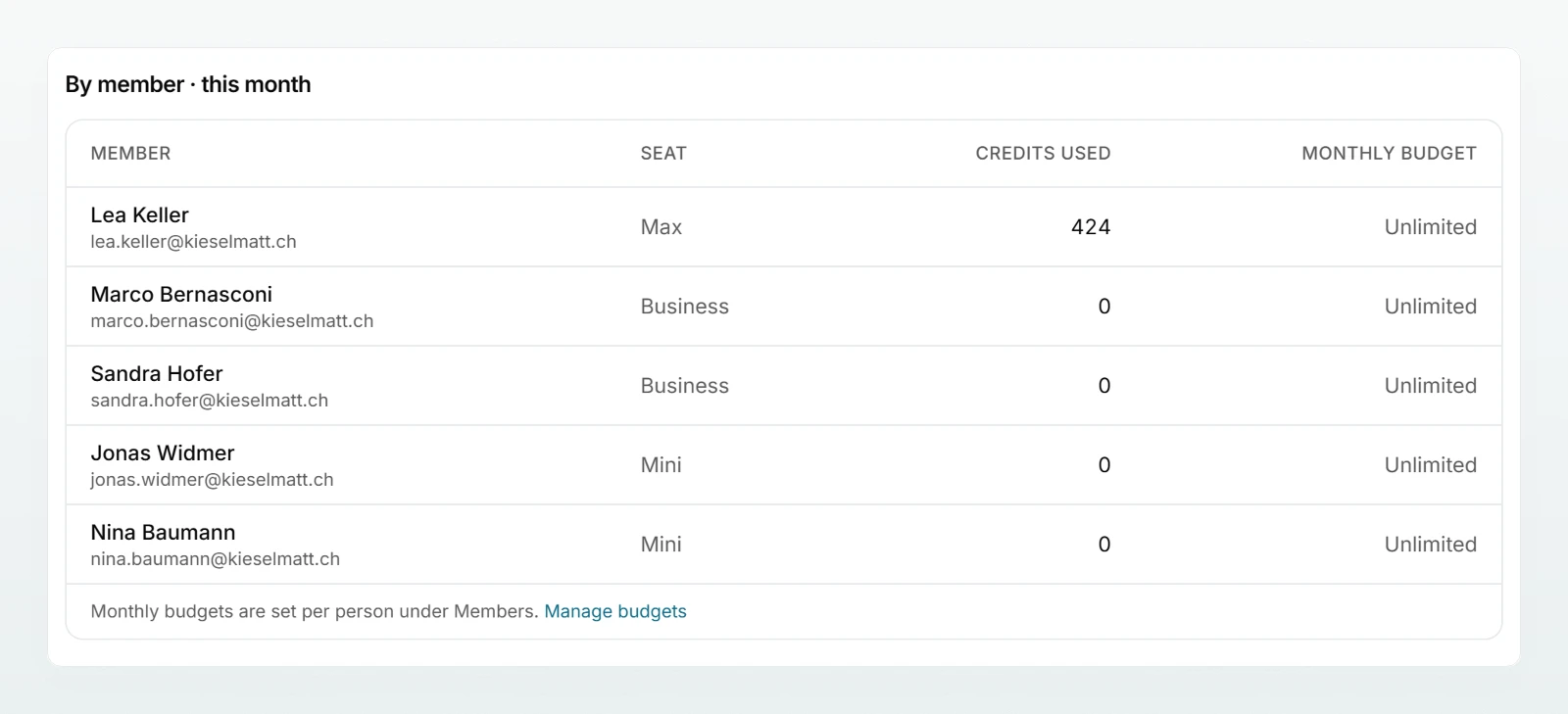
| Question | Where you see it | Benchmark after 30 days |
|---|---|---|
| Is everyone using Custodos? | By member · this month: people with credits used | At least three quarters of the team |
| Does usage last beyond the kickoff? | Credits per day · last 30 days | No drop after week 1 |
| How often do people ask? | Requests · 30 days and the per-day figure | Rises from week 1 to week 4 |
| Which models are used? | By model · this month | Expensive models only where needed |
Three notes on reading it:
- "This month" starts on your workspace's billing day, not necessarily on the first of the month.
- Credits measure activity, not value. Someone working with an economical model uses few credits and can still save a lot of time. That is why the survey belongs alongside the figures.
- If the pool gets tight, Credits and usage explains how monthly budgets per person and additional seats work.
Common pitfalls
- Nobody is responsible. Without an owner, the rollout fizzles out after the kickoff.
- Too much at once. Ten use cases in the first month mean ten half-finished results.
- Presenting the tool instead of the task. People adopt what saves them an hour tomorrow, not a list of features.
- Unclear data protection rules. People who are unsure either do not use Custodos at all or share too much. One page of ground rules prevents both.
- Unchecked results. A single wrong amount in a client email costs more trust than ten good drafts earn.
- Monthly budgets that are too tight in the first month. Once a personal budget is used up, that person cannot keep working until an admin raises it or the new month starts. Only set budgets once you know the usage.
- An outdated brain. Once the chat quotes the old expense rate, nobody asks it again. Decide who maintains the brain.
Next steps
The admin checklist before you start.
Members and rolesInvite, assign roles, set monthly budgets.
Writing good promptsThe page to share with the team after the kickoff.
Credits and usageUnderstand the pool and read the usage page.
After the kickoff, share Writing good prompts and Data protection in daily work with the team.
Data protection in daily work
What belongs in a chat, how to check pseudonymisation, when security mode fits and how to handle images, web search and shared chats.
Writing quotes with an agent
A fiduciary firm builds a quote agent that takes fees from the brain, asks instead of guessing, and fills in the firm's own Word template.