
Company templates
Upload Word, PowerPoint and Excel templates, set one default per kind and give the model notes.
Company templates are your own Word, PowerPoint and Excel files from which the model makes quotes, letters, reports and presentations in the chat. It always works on a copy; the template itself never changes.
Upload a template
Open templates
Open Settings and choose Templates under AI.
Upload the file
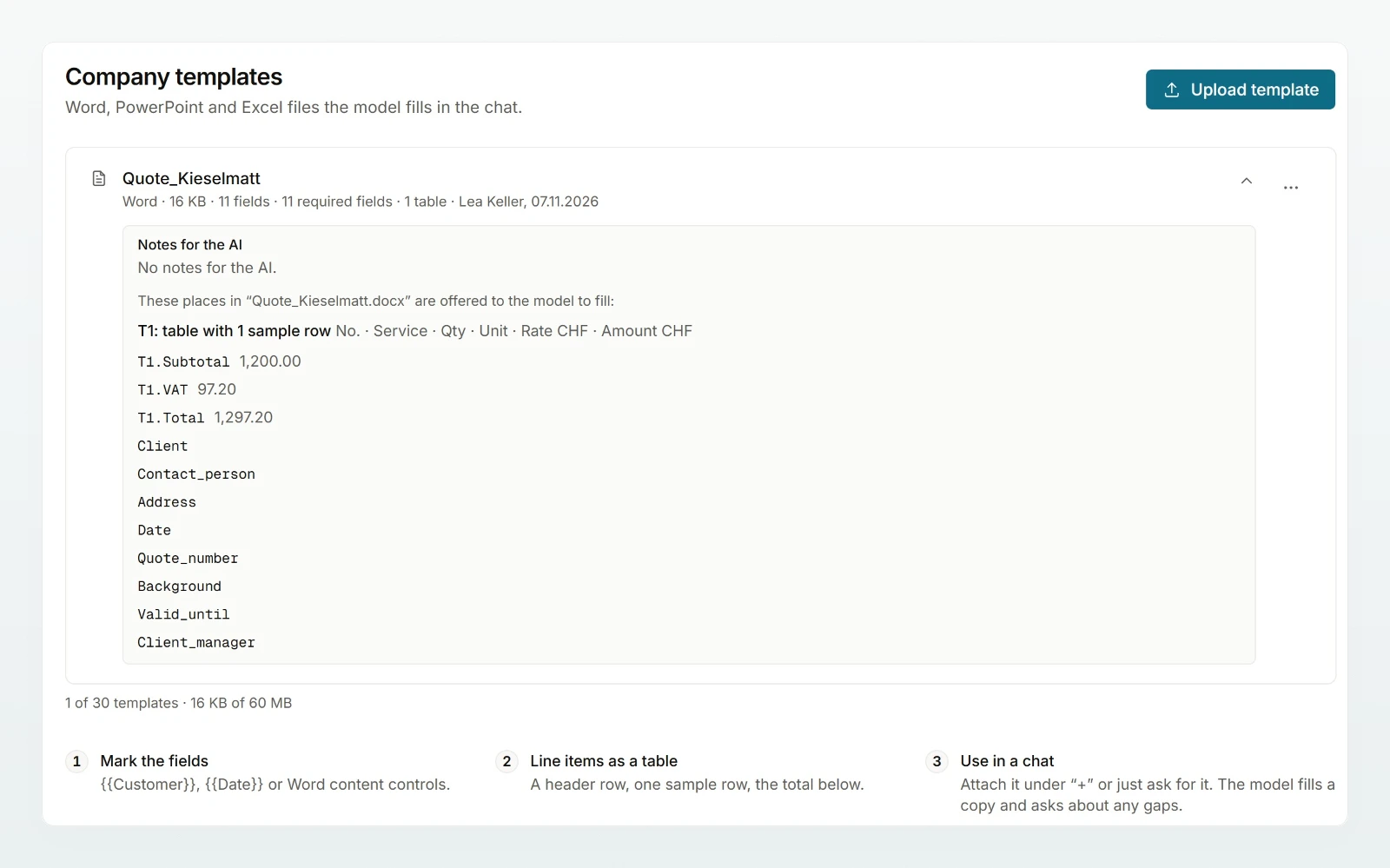
Drag the file onto Drop a quote, letter or presentation here or click Choose file. If there are already templates, use Upload template. The message says what Custodos found, such as required fields, tables, slides and slide layouts.
Check the fields
Click the template's row. You see the places the model may fill, the tables with their sample rows and, for PowerPoint, the slide layouts.
Try it in a chat
Have the template filled once in a new chat with sample details, see Using company templates.
Prepare the file
Markers are not required, but they make the result more reliable.
| In the file | What the model does |
|---|---|
{{Customer}}, [[Customer]], <<Customer>>, Word content controls, sample values such as XXX | Required field: must be filled in or removed. |
Text in «…» or […] | Optional field. |
| A table with a header row, one sample row and a total below | Replaces the sample rows with the line items; the amounts are checked. |
| An empty letterhead without markers | Writes the text in the document's own styles; header and footer stay. |
| PowerPoint | Fills empty placeholders, replaces text in text boxes and builds new slides from the slide layouts. |
| Excel | Fills cells styled "Input", empty cells next to a label and empty tables; it never overwrites a formula. |
A file with nothing to fill is refused; the message says what to add for its kind.
Default and notes for the AI
Under More actions in a template's row:
- Use by default for new presentations (likewise for documents and spreadsheets): when someone asks for a new file of that kind in a chat, the model starts from this template. There is one default per kind.
- Edit notes for the AI: text the model reads every time it uses the template, such as "use slide 3 only for the agenda". At most 2,000 characters. A change also applies to chats that already hold a copy.
- Replace file, Rename and Delete. Chats keep their copy. If saved prompts use the template, the delete dialog says how many; they no longer attach a file afterwards.
If a template contains data your current data protection settings block, its row says so and it is not added to a chat. The notes get the same check when you save them. Your own IBAN and UID on the letterhead are fine: headers and footers that are not a field do not go to the model.
Best practices
- Name fields the way your team talks:
{{Customer}},{{Quote number}},{{Valid until}}. - Leave exactly one sample row in line-item tables and delete old, real line items.
- For presentations, create slide layouts for title, content and divider, and say in the notes what each is for.
Next steps
How members have a template filled in.
Writing quotes with an agentFrom the brief to the finished quote.
Share the page Using company templates with your team.