
Managing web search
Decide whether models may search the web for current information. Only the search query is sent, to a European index.
With web search, models look up current information such as prices, news or details about companies, and name their sources. As an admin you decide whether searching is allowed. The model decides whether a question needs a search, and members choose per chat how thorough it should be.
Switch web search on or off
Open Settings
Click Settings in the sidebar and scroll to the Web search section.
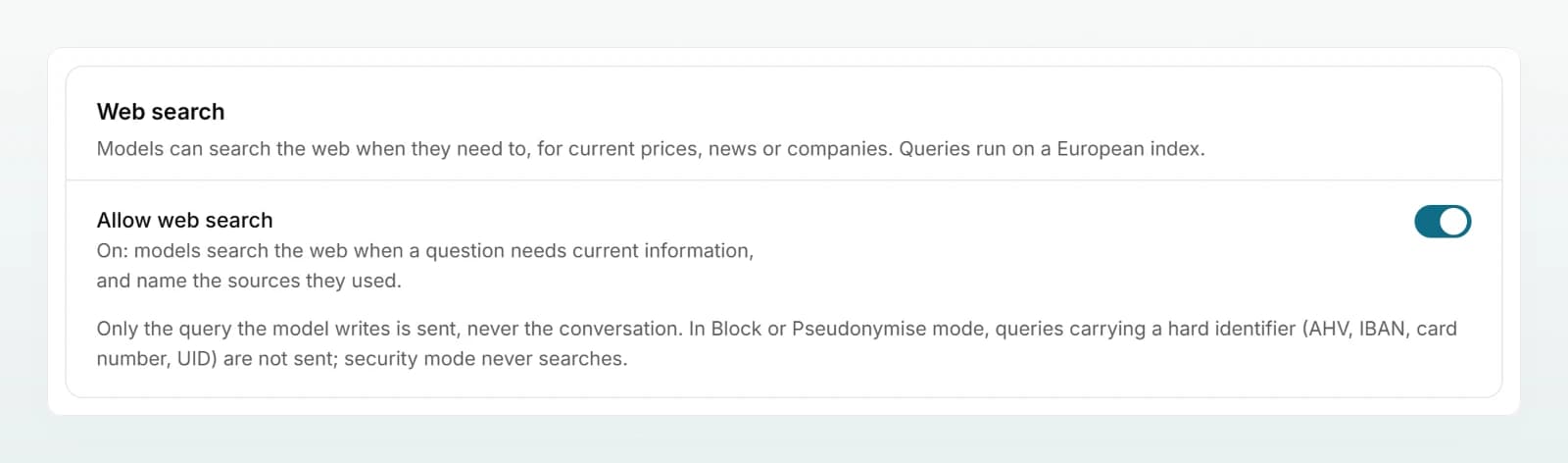
Flip the switch
Flip the Allow web search switch. The change applies at once.
Check the result
Open a new chat. If web search is allowed, the composer shows the Web search chip. If it is off, the chip is missing and models answer from training knowledge only.
What is sent
- Only the query. The model writes a short query of at most 400 characters. The conversation, attachments and brain content are not sent.
- To a European index. The note in the chip tells your members: "Queries go exclusively to a European index hosted in France."
- No hard identifiers. If the workspace is set to Pseudonymise or Block, a query containing an AHV number, IBAN, card number, UID number or a match of a custom rule is not sent. The same applies to a query containing a placeholder such as
<NAME_1>: the model would be asking about a value it was deliberately never given. - Not pseudonymised. A search engine cannot search for a placeholder. In Pseudonymise mode the model only knows the people in your chats as placeholders, so names in a query are usually public names such as companies or products.
- Results unchanged. Search results are public text and reach the model as they are.
- Custodos reads pages itself. In Deep Search the model can read found pages in full, but only pages that appeared in the results of the same reply. The website sees Custodos, not your members.
Cost
A search costs about 0.45 credits on top of the reply's tokens. Only searches that ran successfully are charged. How many searches run depends on the choice in the chip:
| Choice in the chip | Behaviour | Searches per reply |
|---|---|---|
| Automatic | The model searches when the question calls for it. | up to 3 |
| Always search | Searches the web for every reply. | up to 3 |
| Deep Search | Several rounds of searching, pages read in full. Slower and considerably more credits. | up to 8, plus up to 5 pages read |
| Off | No search in this chat. | 0 |
The Usage page shows, below the credit pool, how many web searches ran in the current period. More under Credits and usage.
When no search happens
Even with web search on, there are cases where no model searches:
| Situation | What happens |
|---|---|
| Processing region Switzerland | No web search; the chip is missing. No search index runs in Switzerland alone, so queries would leave the country. |
| Chat in security mode | No web search. |
| Monthly credits used up | No web search until the reset. |
| Model without tools | No web search. The model picker in the chat marks such models: "No web or brain search, and it creates no files." |
| Agent with web search switched off | Chats with that agent do not search. |
| Member chooses Off in the chip | No search in that chat. |
What members see
The composer shows the Web search chip with the four levels from the table; Automatic is preselected. During a search the chat shows the query. The reply refers to the pages found with numbered sources, and the sources are listed with the reply. More under Web search.
Best practices
- Keep web search on. Without it, models answer questions about prices, versions or news from outdated training knowledge.
- Ask the team to open the sources for important statements before passing them on.
- Recommend Deep Search only for real research. For a quick question Automatic is enough.
- Switch web search off in an agent that should work with internal knowledge only, such as an agent for your staff regulations.
Frequently asked questions
No, the switch applies to the whole workspace. You can restrict search per agent, and every member can switch it off per chat.
With Automatic the model decides for itself. Choose Always search in the chip so every reply makes at least one search. Also check the cases in the table above.
In Pseudonymise mode the model sees detected names only as placeholders, so it cannot write them into a query. Queries containing placeholders or hard identifiers are not sent. In Off mode this check does not exist, and the model knows the real names.
Next steps
Levels, sources and citations as your members see them.
Configuring data protectionWhat is blocked in a search query.
Credits and usageWhat a search costs and where you see it.
Where your data livesProcessing locations at a glance.
Share the Web search page with your team.
Setting up security mode
Offer a switch for sensitive conversations that enforces the model you chose, pseudonymisation without exception and no web search.
Sharing and brain access
Decide whether members may share chats, and whether admins automatically have access to every brain or the brain's creator decides.