
Configuring data protection
Choose whether personal data is pseudonymised, blocked or sent as typed before it reaches a model, and add rules of your own.
In the Data protection section of the workspace settings you decide what happens to personal data before a message or an attachment reaches a model. The setting applies to every member, and nobody can weaken it for themselves.
Choose the protection mode
Open Settings
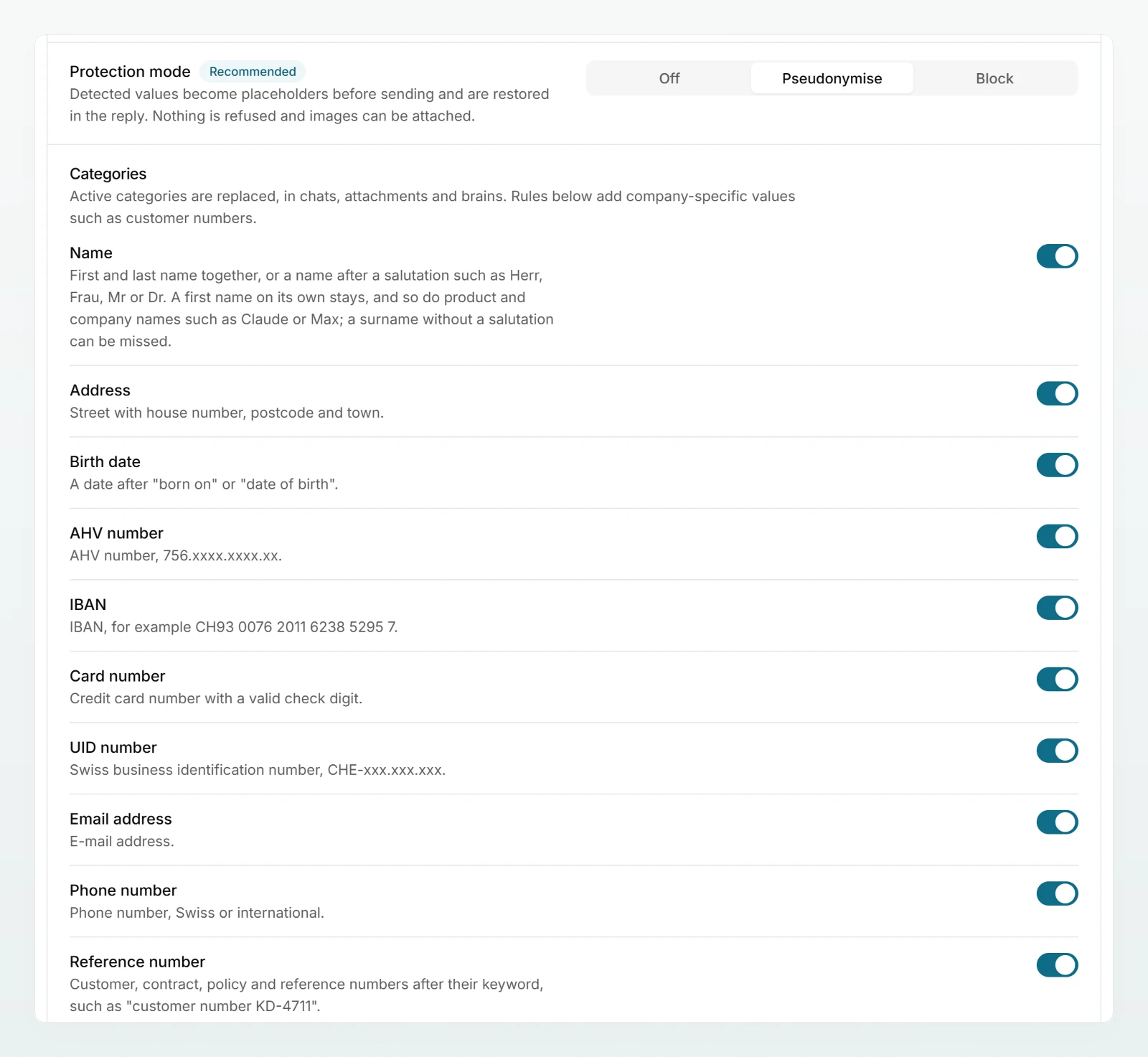
Click Settings in the sidebar. At the top is Data protection: one row per setting, the description on the left, the control on the right.
Choose a mode
In the Protection mode row, choose between Off, Pseudonymise and Block. The row describes exactly what the selected mode does.
Check the categories
Under Categories, every detected category has a row with a switch and one line explaining what is detected. The switch applies to the whole workspace.
Try it with your own text
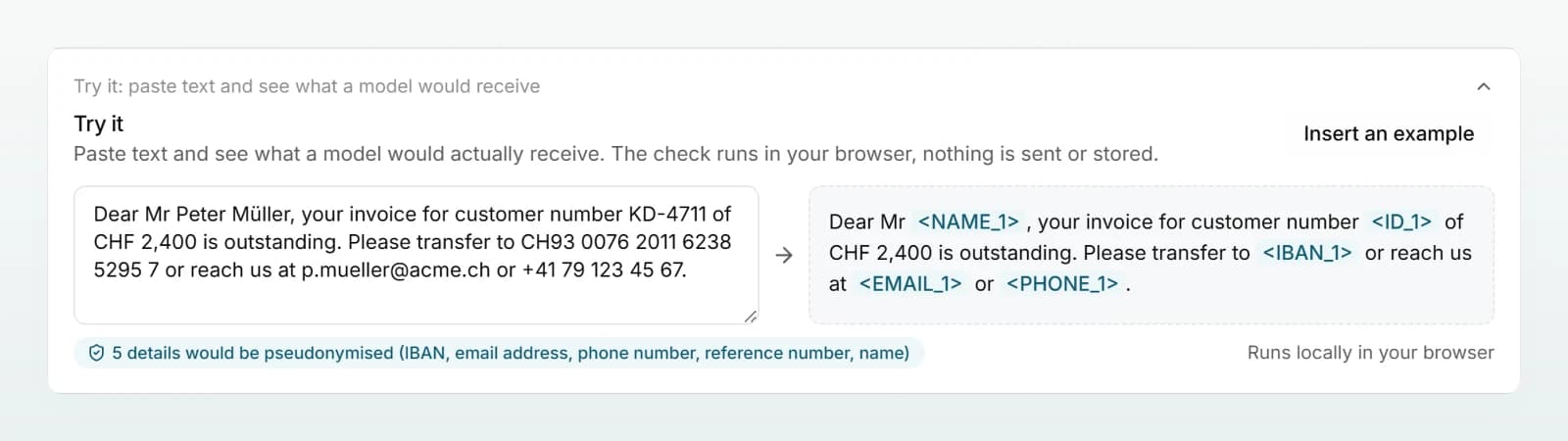
Unfold Try it, paste a typical text and check what a model would receive.
The three modes compared
A new workspace starts on Pseudonymise.
| Pseudonymise | Block | Off | |
|---|---|---|---|
| Names, addresses, emails, phone numbers | replaced with placeholders | sent as typed | sent as typed |
| AHV, IBAN, card number, UID | replaced with placeholders | message refused | sent as typed |
| Match of a custom rule | replaced with placeholders | message refused | no effect |
| Attaching images | possible, not checked | not possible | possible, not checked |
| Work is interrupted | never | on a match | never |
Pseudonymise (recommended)
Every detected value is replaced before sending with a placeholder such as <NAME_1> or <IBAN_1>. The same value keeps the same placeholder throughout the chat, and Custodos puts the originals back into the reply. Nothing is refused.
The trade-off: Custodos recognises names as first and last name together ("Anna Weber") or after a salutation such as "Mr" or "Herr". A first name on its own stays, and so do well-known product and model names such as "Claude" or "Max"; a surname without a salutation can be missed. The Name row under Categories describes how your workspace detects names.
Block
A message containing a hard identifier (AHV number, IBAN, card number, UID number) or a match of a custom rule is refused before it leaves the workspace. The same applies to files containing such details. Names, addresses, emails and phone numbers are not blocked; that is what Pseudonymise is for. Images cannot be attached at all, because they cannot be checked. Choose this mode when a hard identifier must never reach a model, not even as a placeholder.
Off
No scanning; messages and attachments go out as typed. Custom rules have no effect. Chats in security mode still pseudonymise.
Switch categories on and off
Categories lists every category that is pseudonymised, each with a switch. In Block mode the list shows only the four hard identifiers. The choice applies to chat, attachments and brains, but not in security mode: there every category is pseudonymised.
| Category | Detected, for example |
|---|---|
| name | Mr Peter Müller, Hello Anna |
| address | Bahnhofstrasse 15, 8001 Zürich |
| birth date | only after a cue such as "born on" |
| AHV number, IBAN, card number, UID number | 756.1234.5678.97, CH93 0076 2011 6238 5295 7, CHE-123.456.789 |
| email address, phone number | [email protected], +41 79 123 45 67 |
| reference number | only after words such as "customer number", "contract number" or "invoice number" |
Add custom rules
Custom rules cover what only your company has: client numbers, project names, internal identifiers. A number like "KD-482113" with no cue word such as "customer number" in front of it is only detected with a rule. In Pseudonymise mode a match is replaced, and members cannot send it as the original. In Block mode the message is refused with the rule's name.
Open a new rule
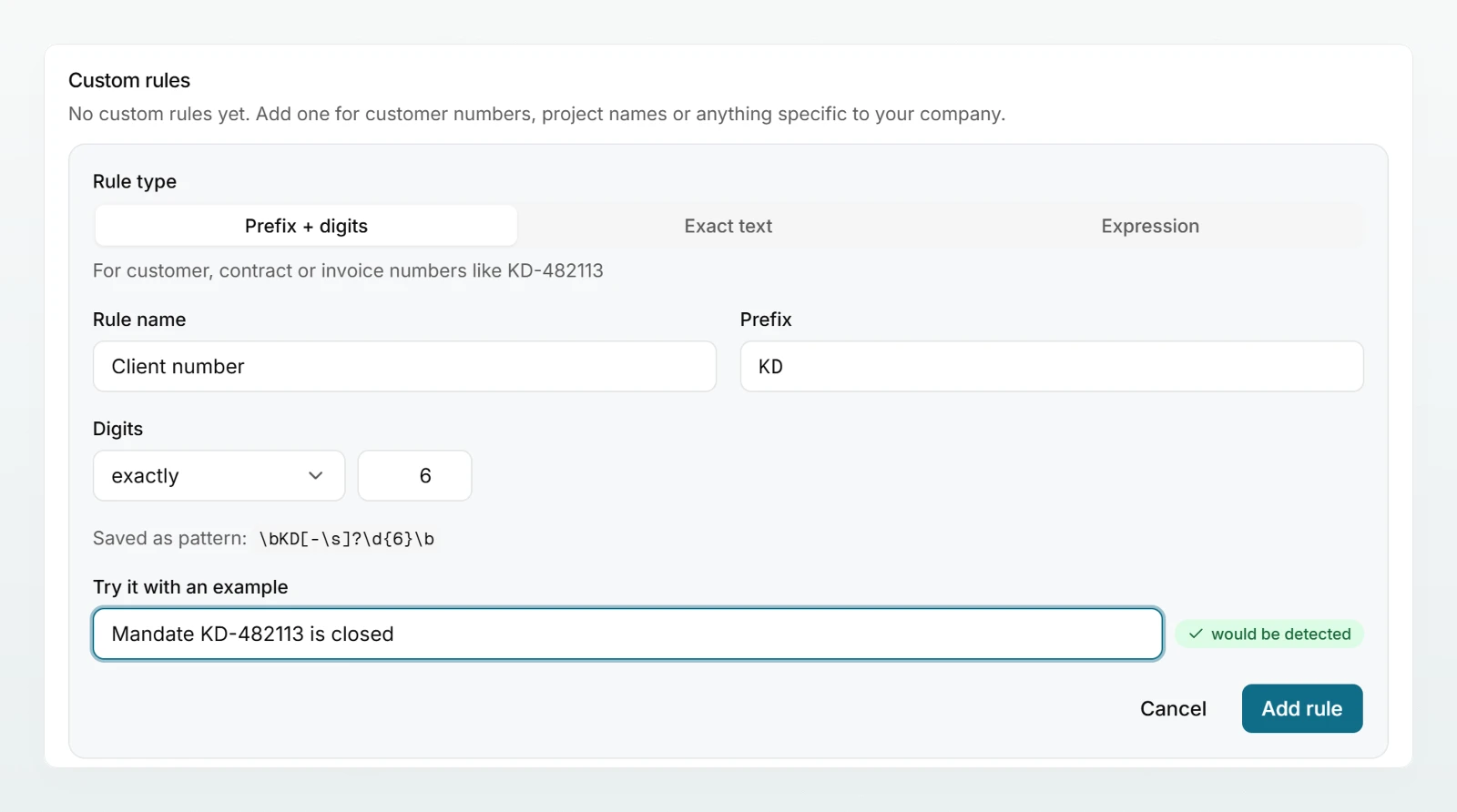
Under Custom rules, click New rule.
Set rule type and pattern
Leave Prefix + digits selected. Enter "Client number" as Rule name, "KD" as Prefix and exactly 6 under Digits. Below, Saved as pattern: shows the resulting pattern.
Test with an example
Under Try it with an example, type a sentence such as "Mandate KD-482113 is closed". If would be detected appears, the rule fits.
Save the rule
Click Add rule. The rule applies at once.
| Rule type | Used for |
|---|---|
| Prefix + digits | customer, contract or invoice numbers like KD-482113 |
| Exact text | a project name or term, for example "Project Eagle" |
| Expression | a regular expression for everything else, for example \bKD-\d{6}\b |
- Between prefix and digits there may be a hyphen, a space or nothing. The prefix "KD" therefore covers KD-482113, KD 482113 and KD482113.
- If you paste a whole number as the prefix, Custodos suggests splitting it into prefix and digits. Apply takes the suggestion.
- Under Digits choose exactly, at least, between or any number of.
- Upper and lower case make no difference.
- The switch in the list turns a rule off, the bin icon deletes it. Rules marked built-in can only be switched off.
Try it
Try it sits folded under the categories in Pseudonymise and Block mode. Unfold it and paste text or click Insert an example. You see what a model would receive, or whether the message would be blocked. The check runs in your browser; nothing is sent or stored. It uses the active categories and the saved rules that are switched on.
What members see
- While typing, a hint shows how many values were detected. In the panel that lists them, a member can send a value as typed for this chat with Send original, except for matches of custom rules and in security mode.
- In Block mode an affected message is not sent and the reason is given. When attaching an image, a message explains that images are locked.
- Their account shows the current protection mode under "How your data is handled here".
Best practices
- Stay on Pseudonymise. Block stops screenshots, and with them a lot of everyday work.
- Add a rule for every internal number format and test it with one example that must match and one that must not.
- Use Exact text for code names of confidential projects.
- Tell the team clearly that images are not checked.
- For client and personnel data, also offer security mode.
Frequently asked questions
The name looks like a person's name, for example a company called "Sandra Meier Ltd". Well-known product names such as "Claude" and a first name on its own are no longer replaced since 18 September 2026. The member can release the value for the whole chat with Send original. If it happens all the time, you can switch the name category off.
Reference numbers are only detected after a cue word such as "customer number". Add a custom rule of the type Prefix + digits.
Either the workspace is set to Block, or the chat runs in security mode. In both cases images are locked because their content cannot be checked.
The categories you switch on and off apply to brains as well. But how strongly a brain protects its content is set on the brain itself, independently of the workspace's protection mode.
Next steps
Placeholders, restoring and the limits of detection.
Setting up security modeFor client work without any exception.
Data protection in a brainThe three levels for retrieved content.
Data protection in daily workWhat belongs in a chat and what does not.
Share the Protecting personal data in chat page with your team.