
Building a good brain
One brain per audience, only current documents, clear instructions, the right access and real test questions, then answers and sources are right.
A brain is only as good as what is in it. If the 2025 expenses policy sits next to the 2026 one, the chat may quote the old amount, complete with a source. This page shows how to build a brain your team can trust. How to create one technically is in Creating a brain.
One brain per audience and topic
Access, instructions and the data protection level always apply to a whole brain. Divide your brains so that all three fit every document in them. Kieselmatt Treuhand AG, for example, works with three brains:
| Brain | Content | Who can use it? | Personal data |
|---|---|---|---|
| Firm handbook | Fee Schedule 2026, Expense Policy 2026, Client Communication Guide, New Client Checklist | Everyone in the workspace, two people edit | Open |
| Personnel | Pay policy, templates for staff reviews | Selected people only | Pseudonymise |
| Client Holzwerk Brunner | Correspondence, contracts, accounts for this client | Selected people only | Pseudonymise |
One big "Everything" brain looks convenient but has three drawbacks: you cannot control access finely, the instructions never fit everything, and on every question unrelated documents compete for the few passages that go to the model.
Many documents: organise, split, ask precisely
From a few dozen documents onwards, order matters more than volume. Three things help:
- Folders for the overview. On the brain page, brains can be placed in folders and sub-folders (up to three levels), for example "Projects", "Templates", "Clients". Folders only organise; who may use a brain does not change. See Organising brains in folders.
- Several brains instead of one big one. An agent can use several brains. Split 100 documents by topic into three or four brains: every search stays targeted, and access and data protection level fit per brain.
- Name the document. With every message, the model knows the list of documents in an active brain (title and one line each). Ask "What does the minutes of 28 August say about risks?" and it reads exactly that document instead of searching the whole brain.
A brain is never read in full. With every message the best-matching passages go to the model, and the model can search again or read one document section by section. Ask it to "read everything" and it reads a bounded part and offers to continue in the next message. That keeps an answer affordable, even with 150 documents.
A passage from a deck names its slide, one from a handbook its chapter. Ask for "slide 7 of the results deck" and the model continues reading right there. The document list the model knows with every message covers about 120 documents per brain; beyond that it states how many are not listed, and search still finds them.
Only current, clean documents
- One version per document. If you upload a new version under the same file name to the same brain, it replaces the old one automatically once it has been processed. If the new version has a different name, mark the old one in the document list with Mark as replaced. A replaced document stays readable but is no longer used for answers.
- No drafts and copies. "Policy_v3_final_new.docx" next to "Policy_v2.docx" confuses people and the model alike. Uploading the same file twice does no harm, though: Custodos takes in identical content only once.
- Split long documents. If a file's text exceeds the import limit, only its first part is searchable, and a warning icon appears next to the title. Split very long handbooks into chapters.
- Scans only where they fit. Custodos reads images and scanned PDF pages with text recognition, but only in brains set to Open. Upload the digital version where you can.
File names that help
Custodos gives every document a descriptive title and a short summary while processing it. The file name still matters: it feeds into both, and it is how Custodos recognises a new version.
For each kind of document, settle on one of two rules:
- A fixed name without a year, for example "Expense Policy.pdf". The new edition replaces the old one automatically on upload.
- A name with the year, for example "Expense Policy 2026.pdf". That is clearer for people, but you have to mark the old edition as replaced by hand.
Avoid names like "Scan_0042.pdf" or "Document1.docx". They help neither processing nor the people who see a source in an answer.
Instructions and overview
A brain's Instructions go to the model with every message while the brain is active in a chat. Write how answers from this brain should look, not what is in it. An example for the Firm handbook:
This brain contains the internal policies and processes of Kieselmatt Treuhand AG. Answer questions only with what the documents say and name the section. If something is not in them, say so and refer to Lea Keller. Amounts always in CHF. Use British spelling.
The Overview is built automatically from the summaries of all documents and helps the model recognise what the brain holds. After larger changes, Custodos rebuilds it once everything has been processed. You can also trigger that yourself with Rebuild overview.
Plan access
- Everyone in the workspace for knowledge anyone may need. Selected people only for clients, personnel matters or projects.
- Few editors. Give Can edit to the one or two people responsible for the content. Everyone else gets Can use.
- Include admins deliberately. Depending on a workspace setting, either admins have access to every brain or the person who creates a brain decides. See Sharing and brain access.
- Agents do not widen access. If a brain is attached to an agent, each person still only gets answers from brains they may read themselves.
- Use the chat default sparingly. Active in new chats by default is only worth it for a brain that matters in almost every conversation.
Details on roles are in Access and sharing.
Choose the data protection level
| Level | Suits | Effect |
|---|---|---|
| Open | Policies, templates, product knowledge, your own records where the actual value is the answer | Passages go to the model unchanged. Images and scans are possible. |
| Pseudonymise | Correspondence and documents with personal data | Names, IBANs and addresses are replaced before the model sees them and put back in the reply. |
| Strict | Brains where hard identifiers have no place | In addition, documents with an AHV, IBAN, card or UID number are refused at upload. |
A brain's level is independent of the workspace protection mode. How it works in detail is in Data protection in a brain.
Check with test questions
Before you hand a brain over to the team, check it with real questions:
- Collect ten questions colleagues actually ask, for example "What is the mileage allowance?" or "What goes on the checklist for a new client?".
- Enter each question on the brain's page under Test the Brain. You see the passages the chat would retrieve.
- If the search finds the right passage, check the answer with Ask in chat and open the source it names.
- If it finds nothing suitable, either the document is missing or the answer is only implied. Add a short note with Paste text, for example "Mileage allowance 2026".
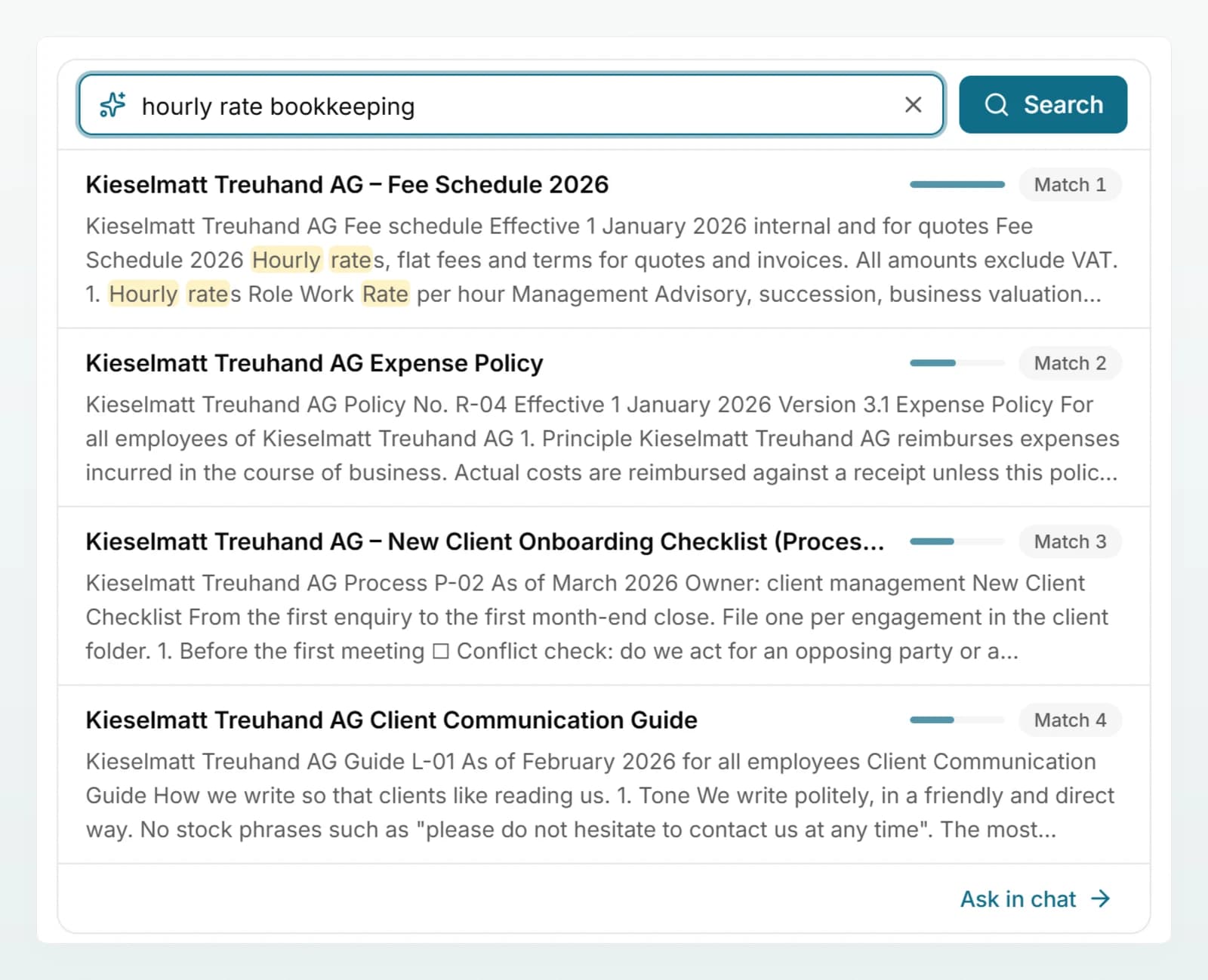
Keep the ten questions. They are your test whenever documents change.
Keep it current
- One owner per brain, named in the description.
- Fifteen minutes once a month: check documents with the status Error and use Process again, upload new versions, mark outdated ones as replaced, ask two test questions.
- Import from Google Drive or Microsoft 365 if the original is maintained there. Custodos checks such documents for changes regularly, and Refresh from source does it straight away.
- Revise Word and Excel files directly: Edit in chat opens an original in a chat, and Save to brain saves the result back as a new version. See Keeping a brain up to date.
Frequently asked questions
Probably both versions are in the brain under different file names. Mark the old one in the document list with Mark as replaced. Fixed file names avoid this in future, because the new version then replaces the old one automatically.
Hardly. Only the best-matching passages go to the model, not the whole brain, and with retrieval set to Automatic only when they match the question. Processing at upload is a one-off cost of about 0.5 credits per 20 pages.
Attach a document you only need in this one chat. Knowledge that several people need again and again belongs in a brain. The comparison is in Company Brain overview.
Check under Test the Brain whether the passage is found. If different wording helps, add a short note using the terms your team uses. Also check that the document has the status Ready and is not marked as replaced.
Next steps
Building good agents
A good agent handles exactly one recurring task, has clearly structured instructions and has been tested with real cases.
Data protection in daily work
What belongs in a chat, how to check pseudonymisation, when security mode fits and how to handle images, web search and shared chats.